Eliminating Paper in the Factory: A Guide to Switching to Digital Production

2026-11-24
Eliminating paper in the factory is not about buying tablets and scanning production reports: it is about having data originate digitally at the machine, be recorded by the person working there, and be visible instantly to whoever plans, purchases, or manages. It works better with a single system covering production, planning, warehousing, and maintenance than with a collection of spreadsheets manually linked together. At Bold Factory, we designed our platform for industrial SMEs with between 5 and 100 operators that want to leave paper and Excel behind without taking on a lengthy project: it can be implemented in a few weeks, with no long-term commitment.
This guide covers the entire journey: the problems paper causes, which processes to tackle first, what to define before implementation, how to get operators to use it, and how to measure the results.
In brief
-
Paper and Excel on the shop floor lead to transcription errors, a lack of traceability, and delays in analysis, making it difficult to make decisions in real time.
-
Start with processes that have three characteristics: they are highly repetitive, involve a lot of manual recording, and directly affect production or quality (quality control, shift reports, maintenance checklists).
-
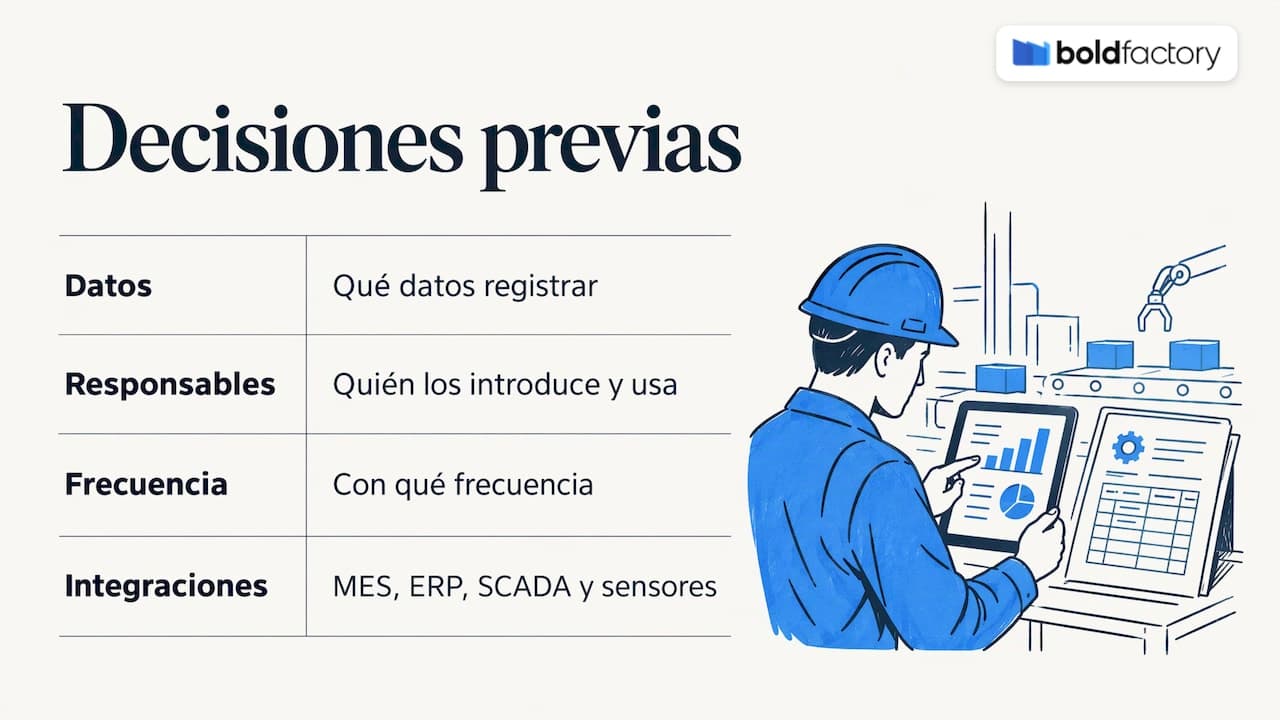
Before implementation, define what data will be recorded, who enters and uses it, how often it is recorded, and which systems it integrates with.
-
You do not need a major technology project: a straightforward MES and tablets on the shop floor are enough to get started, and guided training during the first few days is what makes the change stick.
-
Measure before and after using OEE, first-pass yield, and plan adherence.
Table of contents
-
How to replace paper forms and records without losing traceability
-
Moving away from Excel and integrating planning, warehousing, quality, and ERP
Why paper and Excel end up slowing down the factory
Paper works while the factory is small and the person running it is on the shop floor. The problem appears when orders, shifts, or product references grow: information ends up scattered across printed production reports, notebooks, whiteboards, and several Excel workbooks that no one knows are up to date.
The Acelera Pyme Office guide from AFM Cluster summarizes the consequences of manual records in production, quality checks, maintenance checklists, and incident reports: data transcription errors, a lack of traceability, delays in analysis, and difficulty making decisions in real time. These are four different effects, and it is worth identifying them in your own factory:
-
Transcription: the operator writes something down on paper and someone enters it into Excel at the end of the shift or the next day. Every step creates an opportunity for errors or loss.
-
Traceability: when a customer complains about a batch, reconstructing which material, machine, and operator were involved means searching through folders.
-
Delay: the production manager knows what happened yesterday, not what is happening now. An order delay is detected only once it has become a customer problem.
-
Decisions in the dark: without reliable data, it is impossible to know which machine stops most often, which defect keeps recurring, or which order will be late.
Excel deserves a separate mention. It is an excellent tool for analysis, but as a shared recording system on the shop floor, it becomes a patchwork of versions: every manager has their own file, the formulas depend on one person, and material, planning, and maintenance live in documents that do not communicate with one another. This is the source of the home-grown technical debt that holds back many SMEs: it works, but it gets harder to maintain every day.
Which processes to digitize first
The temptation is to tackle everything at once. AFM Cluster recommends starting with quick wins that meet three conditions: high repeatability, a lot of manual recording, and a direct impact on production or quality. The examples it gives are manual quality control, shift production records, and maintenance checklists.
In a machining, furniture, or packaging factory, the list of candidates usually looks like this:
| Paper-based process | What digitizing it achieves | Who notices first |
|---|---|---|
| Production report by shift | Quantities, times, and stoppages available immediately, with no need to transfer them to Excel | Production and planning |
| Quality control at the workstation | Defects linked to the order, machine, and batch | Quality |
| Maintenance checklists | Recorded, dated inspections and a history for each machine | Maintenance |
| Material movements | Actual stock and the batch consumed in each order | Warehousing and purchasing |
| Incidents | Cause and duration of each stoppage, comparable across shifts | Factory management |
You do not have to choose just one row. But if you need to prioritize, start with the production report: it is the data that feeds almost everything else. Once every manufacturing order has its actual progress recorded, planning no longer has to work from assumptions, and quality and maintenance can rely on the same foundation.
A Spanish industrial example illustrates this approach. In the case of La Flor Burgalesa, described by the Technological Institute of Castilla and León, the company wanted to eliminate paper from its production processes and achieve fully digital production. The solution collected data on the shop floor, planned and controlled every production phase, and used OEE as its measurement indicator. Note the sequence: capture on the shop floor, planning, and measurement using a shared indicator.
What to define before implementation
Most digitization efforts that fail to take hold do not fail because of the technology, but because no one agreed on what would be recorded. AFM Cluster recommends making four decisions in advance: what data to record, who enters and uses it, how often to record it, and which systems it integrates with (MES, ERP, SCADA, sensors). It is worth addressing them one by one.
What data to record
Starting with the paper you use today, make a simple inventory: collect all the production reports and sheets circulating on the shop floor over the course of a week, and note for each field whether anyone uses it afterward. Remove fields no one consults; make the ones people always consult mandatory. A digital report with ten useful fields takes seconds to fill in; one with thirty fields copied from the paper form gets abandoned.
Who enters the data and who uses it
Record the data as close as possible to the person who generates it: the operator at their workstation, the maintenance technician at the machine, the inspector at the inspection station. Also define who uses it: the planner, the quality manager, the general manager. If no one uses it, do not record it; if someone needs it and does not receive it, a field is missing.
How often
Not everything should be recorded in the same way. Stoppages should be noted when they happen; an order's progress at each milestone; and a maintenance checklist according to its schedule. Setting the frequency avoids both gaps and the fatigue of recording too much.
What it integrates with
If you already have an ERP for invoicing, orders, or accounting, the goal is not to replace it but to feed it with actual shop-floor data. Our API integration is designed to connect to your existing ERP, so the order flows down to manufacturing and actual consumption data flows back without duplicate data entry. For the relationship with shop-floor systems such as SCADA, our article on MES and SCADA for SMEs explains how to deploy them in phases.
How to replace paper forms and records without losing traceability
Traceability is the most common concern when leaving paper behind: “At least with paper, I have the signature.” In reality, paper is where records are most often lost, because someone has to file and find them. A well-designed digital system improves traceability because every action is linked to an order, a batch, a machine, and a time.
The step-by-step approach we recommend:
-
Start with a pilot line or cell. Choose an area with repetitive production and a receptive supervisor. Keep paper only in the rest of the factory.
-
Replicate the workflow, not the form. Translate what happens (order start, progress, stoppage, completion, inspection) into events the operator selects on a tablet, instead of copying the form field by field. At Bold Factory, the interface is designed for any operator to use from tablets on the shop floor. In our article on the mobile interface for operators, we explain what it should include and how to validate it in the workshop.
-
Link production and material. Associating material consumption with the order and batch is what makes it possible to reconstruct later what was manufactured with which materials. If there is no link between warehousing and production, there is no real traceability, with or without paper. That is why bringing MES, MRP, and warehousing together in a single system, as we do at Bold Factory, avoids reconciling data between tools.
-
Work from a plan. The orders operators see should come from a production plan, not a printed list, so that what is being carried out matches what was planned.
-
Run both systems in parallel briefly. During the first week, paper and digital records can coexist in the pilot area, just to compare them and build confidence. Then the paper is removed.
-
Expand by area. Once the pilot works, extend it to other cells, adding quality and maintenance.
Moving away from Excel and integrating planning, warehousing, quality, and ERP
Moving away from Excel in production is harder than moving away from paper, because Excel feels digital. The signs that the time has come are clear: the weekly plan is manually redone every Monday, warehouse stock does not match the figures in the purchasing spreadsheet, or only one person understands the main workbook.
The migration principle is simple: anything used as a shared record (orders, stock, stoppages, inspections) should live in a system with a single version of the data. One-off analysis can remain in a spreadsheet, populated with data exported from the system.
A sensible migration order:
-
Orders and production progress, so the plan is based on actual data.
-
Material requirements and purchasing, calculated from orders (the MRP) rather than from parallel spreadsheets.
-
Warehousing, with movements and batches recorded as they happen.
-
Maintenance, with a history for each machine and scheduled inspections.
The usual risk is building a bridge of spreadsheets, macros, and exports that reproduces the problem in a different form. A system that already brings together production, planning and purchasing, warehousing, and maintenance reduces those manual connections, while the API covers the link to your existing ERP.
Equipment and connectivity the factory needs
The good news is that there is no need for a major infrastructure investment. AFM Cluster says that you can use MES systems, industrial apps, or rugged tablets, with data recorded directly at the machine and integration with ERP, SCADA, and sensors. It also stresses that digitizing shop-floor processes does not require major technology projects: in many cases, a clear methodology and suitable tools are enough, and the goal is not just to remove paper but to improve efficiency and traceability.
In practice, the initial list is short:
-
One tablet per cell or group of workstations, with a protective case and, ideally, a fixed mount.
-
Wi-Fi coverage (or devices with 4G/5G) in the areas where records are entered, checked with the tablet at the actual workstation and not just in the corridor.
-
A clear identification method: order codes or references that are easy to select.
-
One person responsible for configuration, usually the production supervisor or IT.
Because it is a cloud platform, there is no server to install in the factory, which shortens the time to get started.
How to get operators to use it
Success is decided on the shop floor. A perfect system that operators see as extra work will end with the paper report back in their pocket.
As a reference for a structured method, a final-year project from the University of Navarra on implementing a process in the Fabril section describes guided training for 12 operators across three shifts, with two engineers supporting each shift, two weeks of intensive training, and then independent work, with a log for each shift and direct feedback. The result was a significant reduction in times after a week of continuous improvement. It is not the same change as moving to digital records, but the approach translates well to an SME.
Principles we apply to any digital deployment on the shop floor:
-
Support at the beginning. Someone should be present on every shift during the first few days, answering questions at the workstation.
-
Few taps per task. If recording a stoppage takes more than three or four taps, it will be skipped.
-
Show operators the benefit. Let them see their own order, plan, and instructions on screen, rather than just “filling things in so they can monitor me.”
-
Listen to the log. Collect what is not working each day and fix it quickly. This shows that the system adapts to the shop floor, not the other way around.
-
One person in charge per shift. Someone operators can turn to for answers without escalating the issue.
If you want a reference for organizing the rollout, our getting started guide walks you through the initial setup.
How to measure whether it worked
Digitizing without measuring is just changing the medium. Before you start, record the baseline and set three or four indicators:
-
OEE (overall equipment effectiveness): combines a machine's availability, performance, and quality. It is the indicator used to measure the La Flor Burgalesa case.
-
First-pass yield (First Time Yield): the percentage of good parts that require no rework.
-
Plan adherence: how much of what was planned is manufactured on time.
-
Response time to a stoppage or complaint: how long it takes you to find out what happened.
A UPC study of the VectorTech assembly plant documents a similar case: paper workflows and disconnected spreadsheets caused errors and a lack of traceability. After implementing an MES, the company monitors OEE, First Time Yield, and plan adherence in real time, eliminates daily paperwork, and reduces scrap costs, with a payback period of under two years. This is a specific case, not a universal promise, but it shows which indicators to look at and the time frames used to assess the investment.
A single system, in weeks, with no long-term commitment
The approach described here works with different tools. At Bold Factory, our aim is to make the transition short: one platform that brings together production (MES), planning and purchasing (MRP), warehousing (WMS/SGA), and maintenance (CMMS/GMAO), with API integration to your ERP and AI agents that automate repetitive tasks based on natural-language instructions. It can be implemented in a few weeks, with no long-term commitment, and is designed for discrete manufacturing operations with between 5 and 100 operators.
The published plans are Lite, at €300 per month; Pro, at €500 per month; and Scale, at €1,000 per month, depending on the number of users and the features selected. For the operations director, this means regaining day-to-day control instead of putting out fires; for the owner, it means seeing the factory without being physically there. If you want to see what your production report would look like on screen, you can start from the Bold Factory homepage.
Frequently asked questions
How long does it take to eliminate paper in a small factory?
It depends on the scope, not the size. A pilot at a workstation with manufacturing statuses can be up and running in days with a ready-to-use platform such as Bold Factory. It is better to expand in phases than to try to change the entire factory on the same day.
Do I need to change my ERP to leave paper and Excel behind?
No. The ERP remains the system for orders, invoicing, and accounting, and the shop floor connects to it through API integration. This way, orders flow down to production and actual consumption data goes back to the ERP without being entered twice.
Is traceability lost when moving to digital?
Quite the opposite: every record is linked to an order, a batch, a machine, and a time, and can be accessed in seconds. The key is to link warehousing and production so that material consumption is tied to each order.
What do I need on the shop floor to get started?
Tablets at the workstations, good Wi-Fi or 4G/5G coverage where records are entered, and a clear definition of what data is recorded and who uses it. AFM Cluster also mentions rugged tablets for demanding environments, and you do not need a major technology project to get started.
Which indicators should I monitor after the change?
OEE, first-pass yield, and plan adherence are the most common. Record their values before you start so you can compare them after a few weeks of use.
Sources
-
How to digitize a manual process on the shop floor, Acelera Pyme / AFM Cluster
-
La Flor Burgalesa: production, quality, and maintenance control, ITCL
-
Analysis of the implementation and improvement of a process, Public University of Navarre (2025)
-
Study for the improvement of the production processes of an assembly plant, UPC