How to implement a virtual assistant with business knowledge in one day

2023-12-19

It seems incredible that just a year ago ChatGPT hadn’t even been released, and today LLMs (Large Language Models) seem to have become a commodity. Unless you find someone very far removed from the tech world, the surprise factor has disappeared.
However, that doesn’t mean we can’t find new ways to bring value to our users by using these technologies. In fact, for me, there was a major problem left unsolved: the training these models have received is based on static information (hence the P in pre-trained), and the context window that could be provided to them was too small for the model to have information specific to each business.
But OpenAI arrived this Monday (Nov. 6) to change the rules once again. With the launch of the Assistants API, it’s possible to upload a set of files containing all the knowledge about your business or application, and OpenAI will process them and implement vector search to answer users’ questions with relevant information.
So I took advantage of this weekend to create a proof of concept with this technology, and I was so convinced by the result that it’s already in production for Bold users.
The design may not be perfect, and not every possible exception may be fully handled, but it works and brings value as of today. A few days ago, a customer asked me a common question and had to wait for someone to answer. Today, Boldy can solve the problem in seconds.
The technical side
Creating a chat from scratch
The first question I had was whether it made sense to communicate directly with OpenAI from the frontend or route the request through my backend, even though I had no intention of saving conversations in a database.
I concluded that it was better to go through the backend, because of the existence of function_calls. This is a relatively new feature through which the model can determine that it needs more information and therefore request it before arriving at an answer.
And where will that information live? In our backend, of course. So it’s better to locate it there to avoid making more round trips than necessary, since this can happen multiple times per request.
Another problem is that previously you sent a message over HTTP and waited for the response; that’s no longer how it works.
You need to repeatedly check the model’s execution status until you have a response, so blocking the request until it arrives didn’t seem like a very good idea, since it can sometimes take a few seconds, depending on how busy OpenAI’s servers are.
The solution is to use WebSockets to send that response from the backend once we have it. In Bold’s case, since we use .NET, I used SignalR, but any WebSockets implementation would work.
With React and Tailwind, creating a Chat component that looks reasonably nice, with opening and closing animations, is quite trivial and can be done in a few minutes.
A little more complicated is orchestrating all the calls to the backend and handling the responses. To simplify this, I used a Zustand store, which lets you centralize all that state management and everything you can do around the chat.
With the frontend ready, let’s move on to the backend and the interaction with OpenAI.
OpenAI’s new Assistants API
The first problem is that the official OpenAI clients are only available in Python and Node. Azure has released its own clients for .NET, but they weren’t up to date (remember, this feature had literally come out 4 days earlier). So I had to implement my own client.
Until now, with the Chat API, each message was independent, and you had to provide all the context.
That has changed with the introduction of Threads and Assistants.
Here’s how it works: each conversation is a thread that OpenAI stores on its servers. The only relevant interaction with the thread is adding a user message.
Once the message has been added, it’s time to launch a Run (something like processing the thread to come up with a response).
The result can be an assistant message or a request to execute a function to get more information.
For now, I’ve ignored the option of adding functions to the assistant, since it would make things too complicated for an MVP, but I haven’t ruled it out for the future.
The thing is, once you launch the run, you have to check its execution status regularly (in my case, every 500 ms), which doesn’t seem very efficient. It would be great if they implemented webhooks or something similar.
Once there’s a response, you have to retrieve all the thread messages again and pass them to the client using SignalR.
Adding context
For all of this to make sense, you have to upload documentation to the Assistant responsible for processing the requests.
Luckily, they support an incredible number of formats, and one of them is markdown, which is how we had the documentation for Bold’s features. Just a few clicks and it was all set.
But one thing was missing: the Bot now knew about the business, but it was blind to what the user was doing, unless the user told it.
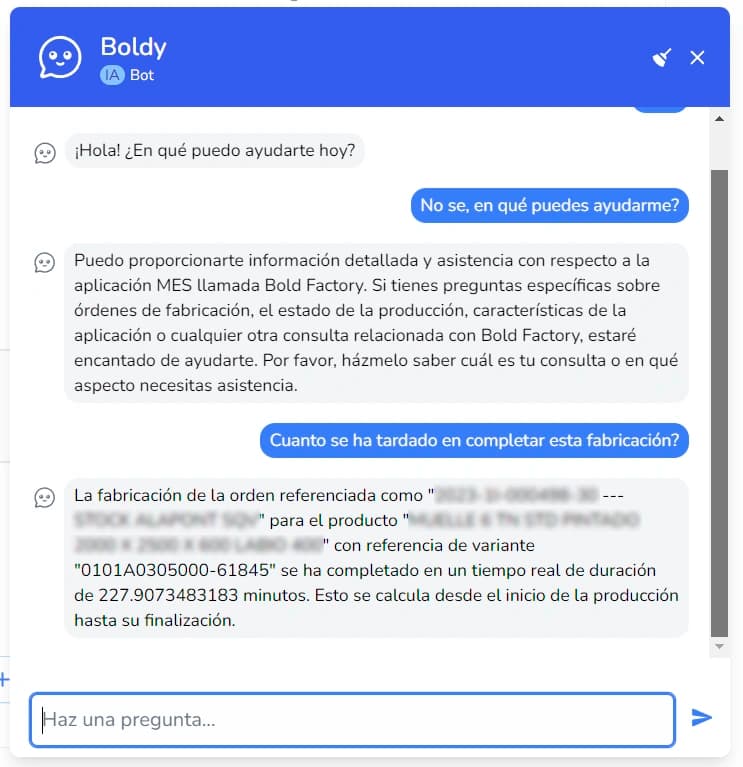
To solve this, on every navigation from the frontend, I save the context in the store—namely, the title of the page the user is viewing and any JSON data from the backend for that page.
This is sent with every message and used to enrich the system prompt (which can be passed as a parameter in each run) with contextual information.
This allows the bot to answer questions about what the user is looking at without having to do anything else.
Opportunities for improvement
Functions are the obvious next step, since they would allow GPT to get more data to answer users’ questions, or even better, to execute actions in the application itself through a text interface.
I have my doubts about whether I should expose the entire Bold API to GPT for data queries, since it seems a bit overkill, and I know Microsoft is doing things in PowerBI Q&A, and they’ll probably do it better than I will.
In any case, it’s still too early to evaluate the model’s performance in this scenario—in fact, the API is still in Beta—but the important thing is to launch as soon as possible, put it in users’ hands, see how they interact with it and what value it brings them, and use that information to keep iterating.