Industrial API with ERP: how to connect the shop floor and management

2026-10-20

Connecting the shop floor to the ERP via an API means production, warehouse, and maintenance exchange data with the management system automatically, without anyone having to re-enter it manually. At an industrial SME, the ERP typically stores orders, items, and costs, while the factory still runs on paper, Excel, and WhatsApp. A good integration closes that gap: orders go down to the shop floor, while actual quantities, times, and consumption data go up to the ERP.
In this guide, we explain what is worth integrating, which type of API to choose, which mistakes to avoid, and how to approach the project so it does not turn into a custom development that weighs the company down for years. We draw on the experience of Bold Factory, a MOM platform for SMEs with between 5 and 100 operators.
In brief
-
An industrial API with ERP lets orders, stock, and shop-floor incidents flow in both directions without manual transcription.
-
Choose a simple architecture: the ERP remains the master for items, customers, and orders, while the shop-floor platform is the source of truth for what happens on the shop floor.
-
Prefer open standards and secure APIs over custom connectors: they reduce technical debt and risk, especially with NIS2 on the horizon.
-
Start with one workflow (manufacturing orders and production reports) and expand later, without a long-term commitment or a project lasting months.
-
If you do not want to handle the integration yourself, at Bold Factory we integrate with the ERP you already have by providing a turnkey service. This development is priced according to the specific case.
Table of contents
Why the ERP alone does not reach the shop floor
ERP is the most widely used digital technology among Spanish companies: according to the INE, 57.4% used it in the first quarter of 2023. Almost all industrial SMEs of a certain size therefore have a management system. What they rarely have is shop-floor information of the same quality.
The reason is one of design. An ERP is designed for accounting: orders, purchasing, invoicing, standard costs. It is not designed for an operator to clock in at the start of an operation on a milling machine, log a two-minute stoppage, or record a batch of raw material on a mobile phone. When people try to make it do that, the familiar symptoms appear:
-
Production reports on paper that someone enters at the end of the shift, with errors and a day's delay.
-
ERP stock that does not match what is on the shelves.
-
A production plan in Excel that the ERP does not know about and only one person understands.
-
Actual costs calculated after the fact, when nothing can be corrected anymore.
The API is the bridge that avoids this double life for data. But a poorly built bridge is worse than having no bridge at all, because it creates a false sense of control.
Which data should travel between the shop floor and the ERP
You do not have to integrate everything on day one. These are the workflows that provide the most value, ordered by how often we see them used as a starting point.
From the ERP to the shop floor
-
Items and bills of materials (BOM): so the shop floor always works with the current product structure.
-
Orders and manufacturing orders: what needs to be produced, how much, and by when.
-
Suppliers and purchase orders: to receive materials against an order and maintain traceability.
From the shop floor to the ERP
-
Production reports: good quantities, rejects, actual times, and operators.
-
Material consumption and warehouse movements: so the ERP stock reflects reality.
-
Batches and traceability: which raw material went into which finished product.
-
Downtime and maintenance: machine hours and intervention costs, useful for accurate costing.
INAD, a company in the steel sector, illustrates this approach. According to a European Commission article, it combines barcodes with its own ERP to digitize entire factories and track resources. The idea is the same on a smaller scale: capture data on the shop floor, and keep a single record in the management system.
Which type of API to choose
There is no universal industrial API. The important thing is to understand the three families you will encounter in a shop-floor-to-ERP integration.
| Option | When it fits | Advantage | Risk |
|---|---|---|---|
| REST API (JSON over HTTPS) | Exchanging orders, production reports, and stock between applications | Very widely used standard, easy to document and test | Authentication, limits, and versioning need to be managed carefully |
| OPC UA | Connecting to machines and PLCs at the OT level | A standard designed to connect the shop floor and management systems | Requires automation expertise and may be excessive for an SME without connected machines |
| Files, staging tables, or ETL | Legacy ERPs without an API or with a limited API | Works with almost any system | Batch processes, limited immediacy, more maintenance |
For a discrete manufacturing SME, the most common combination is a REST API between the shop-floor platform and the ERP, with guided manual data capture (mobile, tablet, barcodes) on the shop floor. Connecting machines via OPC UA comes later, once you know which signals matter to you.
Synchronous or event-based
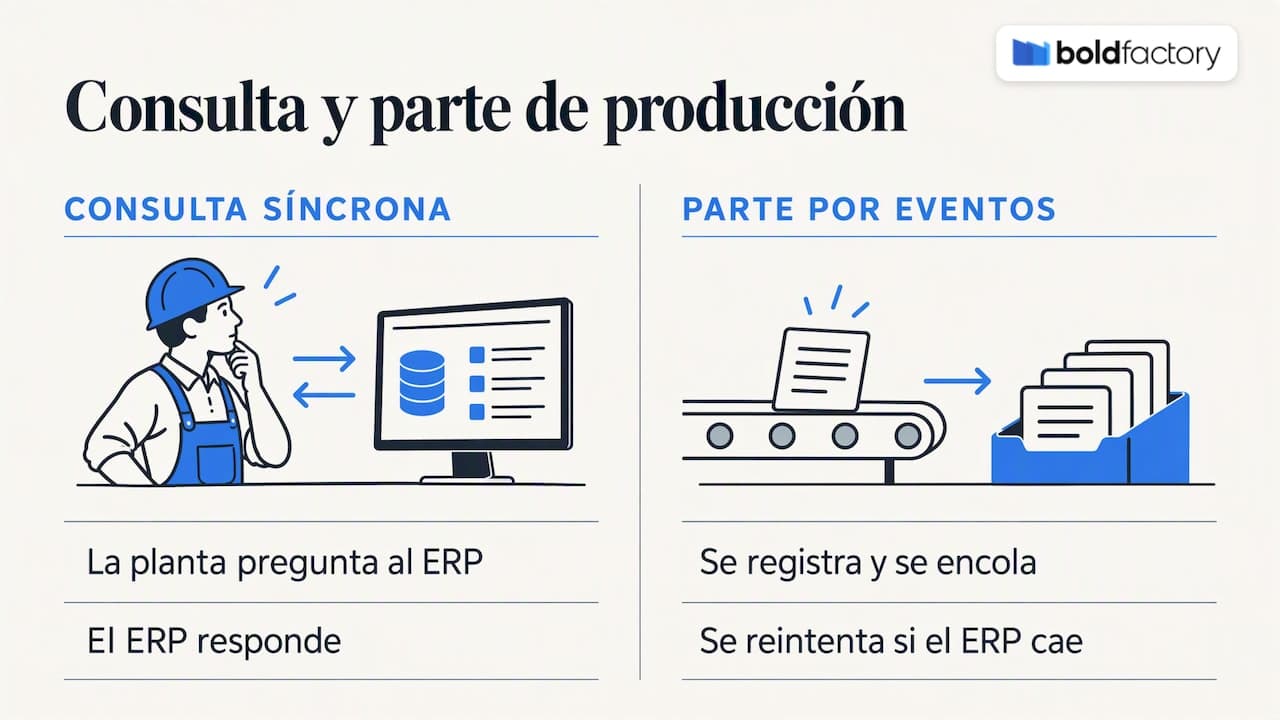
A stock query can be synchronous: the shop floor asks, and the ERP responds. A production report is best handled as an event: it is recorded, queued, and retried if the ERP is down. That way, ERP maintenance on a Friday afternoon does not make you lose shift data.
Who is in charge of each data item
The rule that prevents the most problems is to decide, before writing a single line of code, which system is the master for each data item. Typically:
-
The ERP is the master for items, customers, prices, and orders.
-
The shop-floor platform is the master for order status, times, actual quantities, batches, and downtime.
-
Physical stock is updated in a single place, with movements replicated to the other system.
When two systems can modify the same field, they will eventually overwrite each other.
Mistakes that make an integration more expensive
We have seen the same failures recur, and almost none of them are technical in origin.
Starting with custom development. It is tempting to ask the ERP provider or an integrator for an exclusive connector. It works for the first year. Then an ERP update arrives, a field changes, and the connector stops working. It is the classic case of software that does its job but becomes a greater burden every day: custom code nobody wants to touch and a patchwork of versions that is impossible to maintain.
Integrating before cleaning up the master data. If the same item has two codes or the units of measure do not match, the API will only transfer the disorder faster. Spend a week cleaning up items, BOMs, and routings before connecting.
Trying to integrate everything at once. A project that combines production, purchasing, warehousing, quality, and maintenance in a single milestone ends up taking months. It is better to start with one production workflow, measure the results, and expand.
Forgetting about degraded mode. What should the shop floor do if the ERP does not respond for an hour? The right answer is to keep working and synchronize later.
Treating security as an add-on. We cover this in the next section.
Security and compliance: the API is also an attack surface
Every integration opens a door between systems. ENISA, the European Union Agency for Cybersecurity, addresses the security challenges associated with the evolution of connected industrial systems in its Industry 4.0 study. The practical conclusion for an SME is that interoperability and security must be designed together.
In practice, ask any provider, including us, for:
-
Authentication with credentials or tokens for each integration, never a key shared by everyone.
-
Minimum permissions: the production-report integration does not need to read invoicing data.
-
Encrypted communication and access logging.
-
A clear procedure for updates and vulnerability notifications.
The last point matters because of the supply chain. The INCIBE-CERT FAQ guide on NIS2 explains that the directive expands its scope to sectors and services of greater economic importance, designating them as essential or important entities. Even if your factory is not directly affected, one of your customers may be, and then they will require assurances about your software providers. It is worth checking with your advisor whether your business falls within the scope of the regulation.
Here is an example of what can happen when the fundamentals fail: INCIBE coordinated the publication of a critical SQL injection vulnerability in ERP software, used by an energy retailer. It has nothing to do with manufacturing, but it illustrates why a poorly maintained ERP or API is a real risk.
Automation with AI and human oversight
If you also use AI agents that act on ERP data, it is worth bearing the regulatory framework in mind. In Spain, Royal Decree 817/2023 created a controlled testing environment to trial compliance with the proposed European AI regulation. It is a good reminder that automation must be auditable and that there must always be a person responsible. Our recommendation: let agents propose and carry out repetitive, well-defined tasks, and have a person validate decisions with an economic impact.
How we approach it at Bold Factory
At Bold Factory, we designed the platform with one fact in mind: an industrial SME cannot afford a nine-month integration project (in the best-case scenario). We bring production (MES), planning and purchasing (MRP), warehousing (WMS/SGA), and maintenance (CMMS/GMAO) together in a single system, and connect to the ERP you already use via API, without replacing it.
This changes the integration equation:
-
One point of contact for the shop floor. Instead of integrating four applications with the ERP, you integrate one.
-
An interface designed for operators, accessible from a mobile phone. Data originates on the shop floor and is validated at the point of capture, not on a sheet that gets transcribed later.
-
Implementation in days, with no long-term commitment. You can start with one workflow, check that it works, and grow according to your needs.
-
AI agents with natural-language instructions. They automate repetitive tasks, such as preparing or reviewing order information, without writing scripts.
You can see how connections work on our integrations page. If you would first like to understand how the product works, the getting started guide and the explanation of production plans show what information you generate on the shop floor and, therefore, what can travel to the ERP.
Integration plan in four phases
This is the approach we recommend, regardless of the provider.
-
Inventory (1 week). List which ERP you have, which version, whether it offers an API, and which modules you use. Define the priority workflow, usually manufacturing orders and production reports.
-
Master data (1 to 2 weeks). Clean up items, units, BOMs, and work centers. Decide which system is the master for each data item.
-
Pilot on one line or section. Connect the selected workflow for a small group of operators. For several days, measure the differences between what the shop floor says and what the ERP says.
-
Expansion. Add warehousing and traceability, then maintenance and purchasing. Review permissions and logs at each step.
The timelines are indicative and depend on the state of your data and your ERP's capabilities. If the ERP does not have an API, an intermediate layer or file exchange may be necessary, and it is worth discussing this from the outset.
What to ask before signing up
A short checklist for your meeting with any provider, including us:
-
Which ERPs have you already integrated with, and how: API, files, or your own connector?
-
What happens to the integration when my ERP is updated? Who maintains it, and at what cost?
-
Which data is transferred, in which direction, and how often?
-
How are errors and retries handled?
-
What permissions does the integration have, and who can view the logs?
-
Is there a long-term commitment? Can I leave with my data?
Vague answers usually point to a handcrafted integration, with the maintenance costs that entails.
How much it costs and how to get started
In our case, ERP integration is a service that we price according to the system and scope, so we do not publish a price. This is because the time spent on the project can be affected significantly depending on the information that needs to be synchronized, the direction of the data, and the system's overall architecture.
The application license, hosting, support, and future updates are included in a monthly subscription that varies according to the number of users and the features you need. You can find details of each plan on the pricing page, or view the full platform at bold-factory.com. If you want to find out whether your ERP is a good fit, tell us which system you use and which workflow you would like to automate first.
Frequently asked questions
What is an industrial API, and what is it used for with an ERP?
It is an interface that allows two programs to exchange data automatically and in a structured way. With an ERP, it is used to send manufacturing orders to the shop floor and receive quantities, times, and warehouse movements without having to type them in again.
Can I integrate my ERP if it is old or does not have an API?
Often, yes, although other methods are needed: file exchange, staging tables, or an integration layer. These are valid solutions, but they offer less immediacy and require more maintenance, so it is worth reviewing the options with the ERP provider and the person handling the integration before deciding.
Do I need to replace my ERP to digitize the shop floor?
No. It usually makes the most sense to keep the ERP as the master system for orders, items, and costs, and add a shop-floor platform that connects to it. That way, you avoid a costly migration and keep your administrative processes.
Is an API integration secure?
It can be, if it is designed with authentication for each integration, minimum permissions, encryption, and access logs. Security depends on both the provider and your own configuration, and it is worth reviewing in light of customer requirements or NIS2 regulations.