MPS: What MPS Planning Is and How to Implement It in Your Factory

2026-07-28

The Master Production Schedule (MPS) is the operating schedule that determines what to manufacture, in what quantity, and on what date, based on available inventory, forecast demand, and actual plant capacity. Its immediate value lies in replacing improvisation with data-based decisions: fewer stockouts, more on-time deliveries, and production synchronized with what sales actually needs.
In summary:
Accurate forecasting and adjustments to inventory, orders, and actual capacity are essential for making the MPS reliable and reducing planning errors.
Effective MPS implementation requires a preliminary audit, the definition of time horizons and constraints, and a controlled pilot to validate the plan's reliability.
Automation through APS platforms or MES/MOM systems improves the speed and accuracy of the plan, but key data and exceptions always require human validation.
Aligning sales and production through clear agreements and written rules reduces friction and increases the plan's efficiency on the plant floor.
Prioritizing data quality and starting with small-scale pilots allows small businesses to manage their production more effectively without lengthy implementations.
Table of contents
What is the Master Production Schedule (MPS), and how does it relate to MRP/ERP?
The MPS translates demand (confirmed orders and forecasts) into a specific manufacturing schedule, usually broken down by week or day over a horizon of several months. Unlike an aggregate sales plan, the MPS works at the product or product-family level and answers a very practical question: which line should produce this, and when?
The difference between the MPS and MRP is one of detail. The MPS sets the quantities and dates for finished products; MRP takes those figures and calculates which materials, components, and subassemblies are needed to meet them, along with their own purchasing and manufacturing lead times. One decides the “what and when” for the finished product; the other works out the “with what” needed to get there.
The ERP acts as the source of data and the destination for orders:
-
It provides the MPS with real-time inventory, customer orders, and supplier lead times.
-
It receives planned production orders from the MPS, which are then converted into firm purchase and manufacturing orders.
-
It maintains traceability between what was planned and what was executed on the plant floor.
Without this two-way connection, the MPS becomes an isolated spreadsheet that no one updates on time.
Objectives and measurable benefits of MPS
A well-built MPS is not an administrative exercise: it directly reduces the capital tied up in inventory because it prevents manufacturing “just in case” and aligns orders with what is actually confirmed or reliably forecast. It also improves on-time delivery (OTIF) because production priorities are set in advance instead of being decided in the plant aisle every morning.
Professional tip: if your OTIF has been stagnant for months, first review the reliability of the MPS itself before blaming the production line: a plan that changes every two days creates the same chaos as having no plan at all.
The indicators worth monitoring continuously are:
-
Forecast accuracy compared with actual sales.
-
Percentage of plan attainment (orders executed as scheduled).
-
Actual capacity utilization compared with planned capacity.
-
Safety stock level compared with the stock actually maintained.
In practice, an effective MPS also acts as a consensus agreement between sales and production: when both departments accept the plan as their shared reference, friction over last-minute changes drops significantly.
Essential components and input data for a reliable MPS
Every viable MPS rests on four data pillars. If any one of them fails, the plan it generates will be, at best, a guide and, at worst, counterproductive.
-
Current inventory and safety stock: the system balance alone is not enough; it is worth checking it against a periodic physical count, especially for high-turnover items.
-
Forecasts and confirmed orders: combine historical sales with the firm order backlog, and manually adjust for known biases (seasonality, promotions, new customers).
-
Actual production capacity: measure actual cycle times, not theoretical ones, and calculate a basic OEE for each line to find out how much capacity is truly available.
-
Supplier lead times: a plan that ignores actual purchasing lead times creates delivery dates the plant will never be able to meet.
Professional tip: dedicate the first week of any MPS project solely to auditing these four data points. It is the least glamorous task and the one that most determines whether the plan will work. Human intervention to validate this input data remains the critical step, even when the subsequent calculation is automated.
How to create and implement an MPS step by step
Implementing an operational master production schedule does not require a months-long project. Follow a logical sequence that you can complete in weeks if the initial data is reasonably well organized.
-
Audit and clean the data: check inventory, supplier lead times, and actual capacity before using any calculation tool.
-
Define time horizons and the level of aggregation: decide whether you will plan by item (SKU) or by product family, and set the time horizon (weeks, months) according to demand variability.
-
Validate capacity and prioritize constraints: identify the plant's actual bottleneck and build the plan around that limitation, not the other way around.
-
Launch a pilot: test the MPS with a small group of items, using clear governance rules about who can change the plan and when.
-
Start the review cycle: set a review cadence, usually weekly, with a defined process for handling exceptions (urgent orders, breakdowns, supplier delays).
Before scaling the pilot to the whole plant, check the following:
-
The plan can withstand last-minute changes without falling apart completely.
-
The people responsible for sales and production interpret the plan in the same way.
-
Exceptions are handled according to a written rule, not on a case-by-case basis depending on who shouts the loudest.
Step-by-step MPS implementation guides agree on one point: a limited pilot reduces the risk of a bad initial data point contaminating the entire factory.
Tools to automate MPS without losing control
Spreadsheets work while the catalog is small and stable. As the number of items, last-minute changes, or production lines grows, Excel can no longer keep up with the review pace an MPS requires.
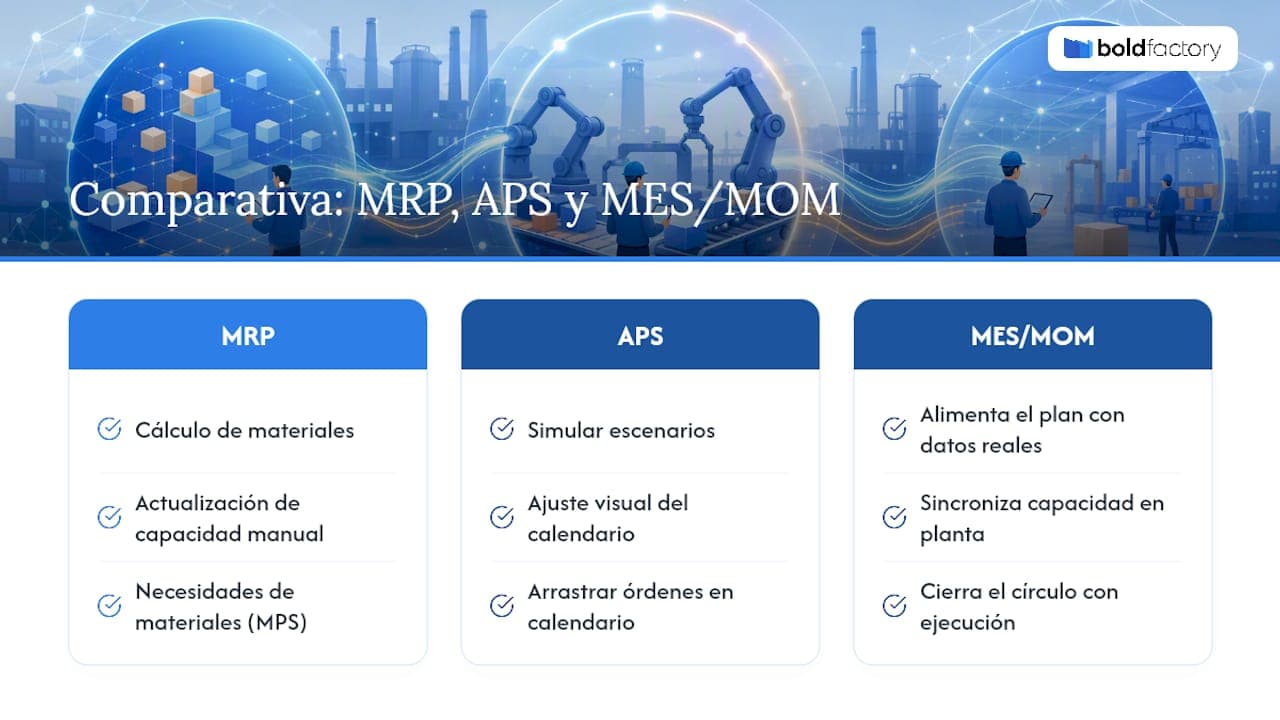
MRP systems add automatic material requirements calculations, but many still depend on manual capacity updates. APS platforms (advanced planning) go a step further: they let you simulate scenarios and adjust the schedule visually, dragging orders around in an interactive calendar. Integrated MES/MOM systems close the loop by feeding the plan with actual plant data instead of estimates.
What should be automated is recalculation when orders or capacity change, deviation alerts, and the generation of routine orders. What still requires human judgment is the validation of input data and the resolution of complex exceptions—something that the MPS calculation function in ERP systems cannot replace on its own.
Professional tip: if your team spends more time correcting the plan than executing it, the problem is not the tool: it is that no one is validating the data before it goes in.
Industrial production control software that connects the plant and planning in one system avoids this mismatch between what the plan says and what is actually happening on the line.
Best practices and common mistakes in MPS implementations
The most common mistake is delegating all validation to the software from day one, without anyone checking whether the initial data makes sense. The second is failing to align sales and production through a clear operating agreement on what happens when an urgent order arrives and whether it can be accommodated.
-
Set written rules for prioritizing exceptions instead of making up decisions each time.
-
Monitor discrepancies between system inventory and physical stock: if they grow, the plan loses reliability before anyone notices.
-
If the team constantly reviews the plan for no apparent reason, suspect a poorly calibrated input datum, not the process itself.
-
Low adoption by operators usually indicates that the plan does not reflect the reality of the plant, not that people are resistant to change.
What really changes when an SME adopts an MPS
What changes most is not the tool, but the mindset: moving from putting out fires every morning to managing a plan that has already anticipated problems. In small factories, a well-informed MPS cuts urgent decisions in half within a few weeks. Prioritize data and a limited pilot before thinking about automating anything.
There are alternatives to custom development for industrial SMEs that need an operational MPS without months of implementation or a mandatory commitment. Some platforms, such as Bold Factorty, integrate planning and purchasing (MRP), production control (MES), warehousing (WMS), and maintenance (CMMS) in one system, with AI agents that automate plan recalculation and deviation alerts through natural-language instructions.
An important benefit for the person responsible for planning is real-time inventory visibility, without relying on outdated spreadsheets. You can start with a platform demo, define a pilot for a small group of items, and deploy Bold Factory's MRP in days, not months.
Frequently asked questions
What is the Master Production Schedule (MPS)?
It is the schedule that sets which product to manufacture, in what quantity, and on what date, based on inventory, demand forecasts, and available capacity.
What is the difference between MPS and MRP?
The MPS decides the quantities and dates for finished products; MRP calculates which materials and components are needed and when to order them, based on those figures.
What are the elements of a master production schedule?
The four basic elements are current available inventory, demand forecasts, confirmed customer orders, and actual production capacity, including supplier lead times.
Can you give me a practical example of MPS?
A machining SME that manufactures three families of parts can set a weekly MPS for each family, adjusting quantities according to confirmed orders and reviewing the plan every Monday using actual plant data—something platforms such as Bold Factory make easier by connecting planning and execution in one system.