Barcodes in the Warehouse: A Practical Guide for Industrial SMEs

2026-09-15
Implementing barcodes on products, pallets, and locations is the right decision for almost any industrial SME that still manages its warehouse with paper or spreadsheets. The practical result is fewer picking errors, faster inventory counts, and genuine traceability of batches and expiration dates. To achieve this, you need just four components: 1D or 2D codes depending on the situation, readers suited to the environment, printers capable of producing durable labels, and warehouse management software (WMS or SGA) that receives each scan in real time.
In brief:
Implementing barcodes reduces errors, speeds up inventory counts, and improves traceability in warehouses, making it a worthwhile investment for most industrial SMEs.
The choice of code type (1D, 2D, or GS1-128) depends on the amount of information required, the environment, and the space available on labels.
Readers, printers, and labels should be selected based on the warehouse’s actual conditions to avoid repeated scans and frequent data-capture errors.
Project planning, including a preliminary inventory and a pilot phase, reduces risks and prevents having to redo all the labeling after a poorly designed implementation.
It is essential to integrate scans with the management system (WMS or ERP) in real time to maintain complete traceability and reduce discrepancies, especially in the physical location of products.
Table of contents
-
How to choose readers, printers, and labels for your warehouse
-
Best practices and common mistakes in real-world implementations
-
The author’s perspective on implementation in industrial SMEs
-
How Bold Factory integrates barcode scanning with your WMS and ERP
What a warehouse barcode is and its identification levels
A warehouse barcode is the visual representation of data (an SKU, a GTIN, a batch, or a location) that a reader translates into information the management system can understand. It is more than just a label stuck to a box: it is the bridge between what is physically on the shelf and what the software believes is there.
In practice, a well-coded warehouse operates at several levels at once. The most basic is the individual unit or reference (the product’s SKU or GTIN), followed by the logistics grouping (boxes, cartons), the full pallet, almost always identified with a GS1-128 code, and the physical location: aisle, rack, and bin.
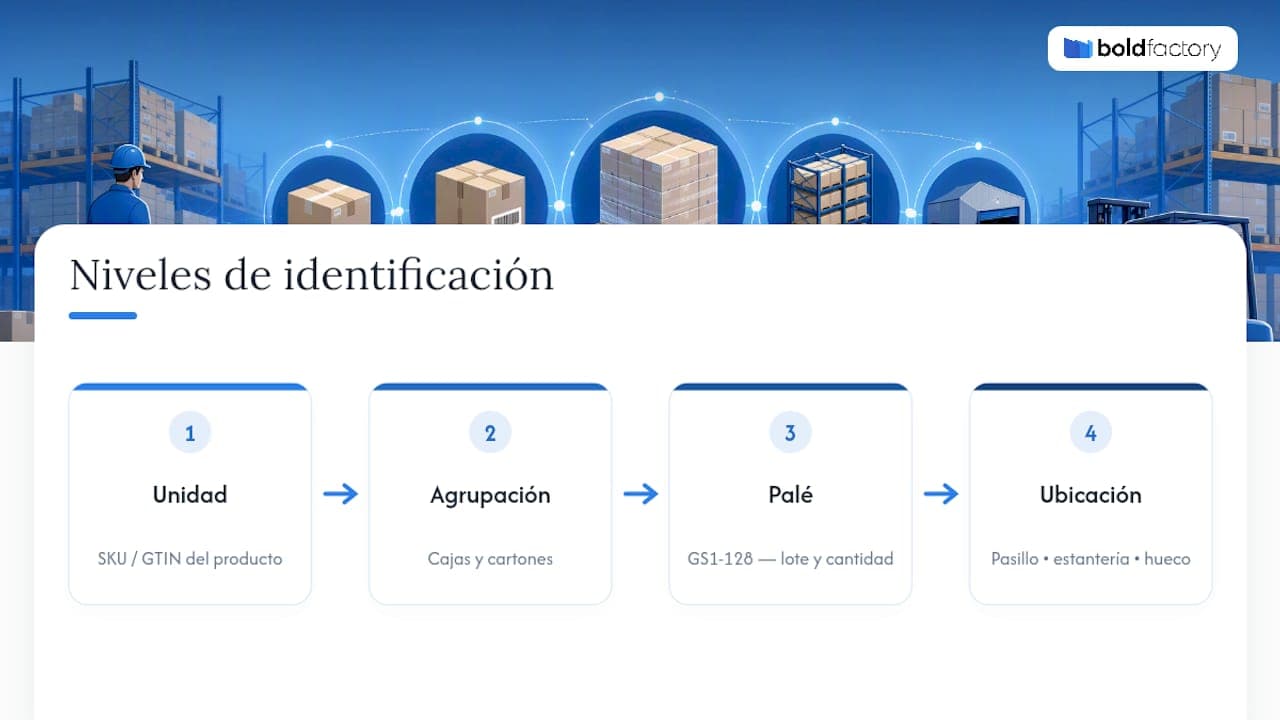
Each scan provides the system with a different piece of information. Scanning a product confirms what it is; scanning a pallet confirms the batch, quantity, and sometimes expiration date; scanning a location confirms where that product is physically located at that moment. Without this third level, the system knows what you have, but not where it is—and that is where traceability breaks down.
Operational benefits and which metrics actually improve
The most immediate benefit of barcodes is reducing human error in repetitive tasks. Manually recording a movement on paper or in Excel introduces transcription errors that a scanner simply does not make: the data is captured automatically and reaches the system without intermediate steps, which speeds up processes such as picking and shipping.
The improvements are noticeable in several aspects of day-to-day warehouse operations:
-
Faster picking, because the operator confirms the correct reference without searching visually or comparing numbers by hand.
-
Faster cycle counts, since counting by zone with a reader reduces operational downtime.
-
Fewer stockouts caused by counting errors, because the data is updated at the time of each movement.
-
Nearly automatic batch and expiration-date traceability, which is essential in food, pharmaceutical, or short-shelf-life component sectors.
Professional tip: Before measuring any improvement, define what you will compare. A pilot without a baseline (times and errors before implementation) does not let you demonstrate the return to management.
To justify the investment to management, it is best to decide in advance what to measure: seconds per picking operation, error rate, and inventory accuracy are the three variables that best reflect the real impact of the change—much more so than a general impression that “things are faster now.”
Barcode types: 1D, 2D, and GS1-128, and when to use each
The choice of symbol type depends on how much information you need to encode, the distance from which it will be read, and the physical conditions in which the label will be used. There is no single code that is right for the entire warehouse.
-
1D codes (EAN, GTIN, Code-128): limited data capacity, but quick to read, inexpensive to print, and sufficient for identifying a product reference in most picking and sales operations.
-
2D codes (QR, DataMatrix): encode much more information in a small space and better withstand minor label damage, making them ideal for detailed traceability or when the space available on the product is limited.
-
GS1-128: the reference standard for pallets and logistics groupings, because it can include the batch, expiration date, and quantity in a single symbol, which is essential in sectors with strict health or regulatory requirements.
A metal components manufacturer may need little more than Code-128 on each part and GS1-128 on the outbound pallet. A food or pharmacy warehouse, on the other hand, can hardly do without DataMatrix or GS1-128 to meet batch traceability requirements.
How to choose readers, printers, and labels for your warehouse
Reading technology is not an aesthetic choice: it determines how many scan retries your operators face each shift. A poor choice here costs you minutes—not just once, but hundreds of times a day.
-
Define the actual reading range. If operators scan high shelves or pallets from a forklift, you need long-range readers; if scanning happens just a few centimeters away at a packing station, a short-range, economical reader is enough.
-
Choose between laser, CCD, or imager. Laser readers work well with 1D codes at a distance, while imagers also read 2D codes and better tolerate damaged or poorly printed labels, making them the most flexible choice if you are not yet sure which symbols you will use in the future.
-
Consider omnidirectional scanning. An omnidirectional reader means the operator does not have to orient the label at a specific angle, saving accumulated seconds in each operation.
-
Choose the printer based on volume and environment. For long-lasting labels in cold conditions or outdoors, thermal-transfer printing with resin or wax ribbon usually withstands conditions better than direct thermal printing, which degrades over time and with heat.
-
Allocate terminals according to the workflow. Fixed stations work well at checkpoints such as receiving or shipping; PDAs or mobile terminals are better for picking and relocations within the warehouse.
Professional tip: Don’t buy first and test later. If possible, request a sample unit of each candidate reader and test it for a week in your own warehouse, using your own labels and ambient lighting, before deciding on the full order.
Step-by-step implementation: planning, pilot, and rollout
A barcode implementation that starts without a location map almost always ends up creating more confusion than it resolves. The order of the steps matters just as much as the steps themselves.
-
Take an inventory and create a location map. Before printing anything, you need to know which SKUs exist, how many packaging variations they have, and how the aisles and racks are physically organized.
-
Design the coding scheme. Decide which symbol each level uses (product in 1D or 2D, pallet in GS1-128, location in the format you choose) and document that hierarchy so it does not change halfway through the project.
-
Print and place the first labels in a pilot area. Start with a single picking line or a specific aisle, not the entire warehouse all at once.
-
Measure the pilot using real data. Compare time per operation and error rate before and after, over at least one or two weeks of normal operation—not just a single test day.
-
Make adjustments and roll out in phases. Correct what failed in the pilot (label placement, reader range, insufficient training) before extending the system to the rest of the warehouse.
-
Train operators using real cases. Training works better when it is based on the warehouse’s own workflow, not generic examples unrelated to daily operations.
This sequence reduces the risk of having to redo the labeling across an entire warehouse because the scheme chosen during the design phase did not fit the reality of aisle three.
WMS or ERP integration: why scanning locations is critical
Each scan must carry a minimum set of data to be useful: what the product is, its location, which batch it belongs to, who made the movement, and the exact time it took place. Without these five fields, the system receives incomplete information and traceability is compromised.
An integrated warehouse management system must receive and process these scans in real time, not in batches at the end of the day. Integration can be done through a real-time API, which updates stock instantly, or through periodic synchronizations with subsequent reconciliations, which are slower but sufficient for lower-volume operations.
The element that truly makes the difference is scanning the location with every movement: receiving, relocation, picking, and packing. Linking each physical movement to its logical location is what reduces discrepancies between what the system believes is there and what is actually on the shelf.
-
Fewer inventory discrepancies at month-end.
-
Immediate location of any reference without walking the aisles.
-
Complete traceability of a batch from receiving to shipping.
-
Visibility for management without relying on periodic manual counts.
Production control software integrated with the WMS also prevents the need to manually synchronize two different systems that speak different languages.
Label materials and durability according to the environment
A standard paper label holds up well in a dry, temperate warehouse, but fails quickly in cold rooms, areas with constant humidity, or on surfaces subject to mechanical abrasion. In harsh environments, direct thermal paper degrades and becomes illegible in weeks, not months.
For those cases, synthetic labels printed using thermal transfer with resin or wax ribbon withstand abrasion, cold, and humidity much better. The adhesive matters too: one designed for plastic does not always adhere as well to rough wood or metal, so it is worth choosing it according to the actual surface where the label will be used, rather than going with whatever comes by default on the roll.
Professional tip: Before buying thousands of labels, stick a dozen in the most hostile area of the warehouse (the cold room or a dock exposed to the elements) and check their legibility after seven and thirty days.

Placement also affects durability: a label at a height where it is handled constantly wears out sooner than one placed outside the area of direct contact, even if the material is identical.
Best practices and common mistakes in real-world implementations
Most barcode projects that do not deliver the expected results share the same failures, almost all of which can be avoided with a little discipline during the design phase.
-
Do not underestimate location labeling: without it, genuine traceability does not exist, even if the rest of the system works perfectly.
-
Test printers and readers in actual warehouse conditions before buying in bulk, not just on the supplier’s desk.
-
Train operators using standardized processes and specific examples from their own daily work, not generic manuals.
-
Avoid label materials that are unsuitable for the environment: this is the most expensive mistake to correct after rollout.
-
Do not forget periodic reconciliation between physical inventory and the system during the first few weeks, even if scanning works well from day one.
Many SMEs start labeling products and pallets but leave locations for “later.” That is the mistake that generates the most discrepancies in the medium term. I would start with the highest-impact processes (receiving, picking, shipping) and measure there, rather than across the whole warehouse at once. And I would avoid managing the scanning hardware, WMS, and ERP separately: the fewer suppliers involved, the less friction there is when something goes wrong on a Monday morning.
There are solutions that avoid building a custom project to connect barcodes, warehousing, and production, integrating hardware, WMS software, and ERP in a single platform with fast implementation.
Bold Factory’s warehouse management module (WMS/SGA) receives every product, pallet, and location scan in real time and automatically cross-references it with the production control module, so the available stock on the factory floor and in the warehouse always stays synchronized without manual reconciliations. The platform can include artificial intelligence agents that automate repetitive replenishment tasks or minimum-stock alerts with natural-language instructions, and the interface can be designed for operators to use on their mobile phones, with the aim of making it easier to use. If you manage a warehouse in an industrial SME, you can request a demonstration to check the implementation time for location scanning, with the aim of evaluating the solution.
Sources
For further information on the technical criteria and standards mentioned in this guide:
-
How to implement barcodes in a warehouse and choose the right reader: an overview of technologies
-
Warehouse barcodes: The definitive guide to efficient inventory management
Frequently asked questions
What are the most commonly used barcodes in warehouses?
The most common are EAN and Code-128 for identifying individual products, DataMatrix or QR for detailed traceability in a small space, and GS1-128 for pallets with batch and expiration-date information.
What is the best software for managing a warehouse with barcodes?
It depends on the size of the operation, but industrial SMEs should prioritize integrated software that combines WMS with production and ERP, rather than isolated systems that require constant manual reconciliations.
How do you get barcodes for your own products?
You request a company prefix from GS1 to generate unique GTINs for each reference, and then print them using a thermal or thermal-transfer printer, depending on the durability required for each label.
What exactly are location codes in a warehouse?
They are labels placed on aisles, racks, and bins that identify an exact physical position. When scanned together with the product, the system knows precisely where each reference is at any given time.