What Is an MRP: Why the Calculation Is the Easy Part

2026-09-24

It’s 5:30 p.m. on a Thursday, and the purchasing manager has to finalize next week’s order from the sheet metal supplier.
They open the stock screen: 340 units. They know it isn’t 340. There was a consumption last week that nobody recorded, two pallets are still unlocated at the loading dock, and the material returned by a customer is still counted as good. So they do what they’ve been doing for twelve years: look at the number, take a little off by guesswork, add a margin just in case, and place the order.
What just happened isn’t a failure on that person’s part. It’s exactly the calculation an MRP does, done by hand and with worse data. And it explains why so many factories buy a planning system expecting it to solve the problem, only to discover a few months later that the problem was never the calculation.
In summary
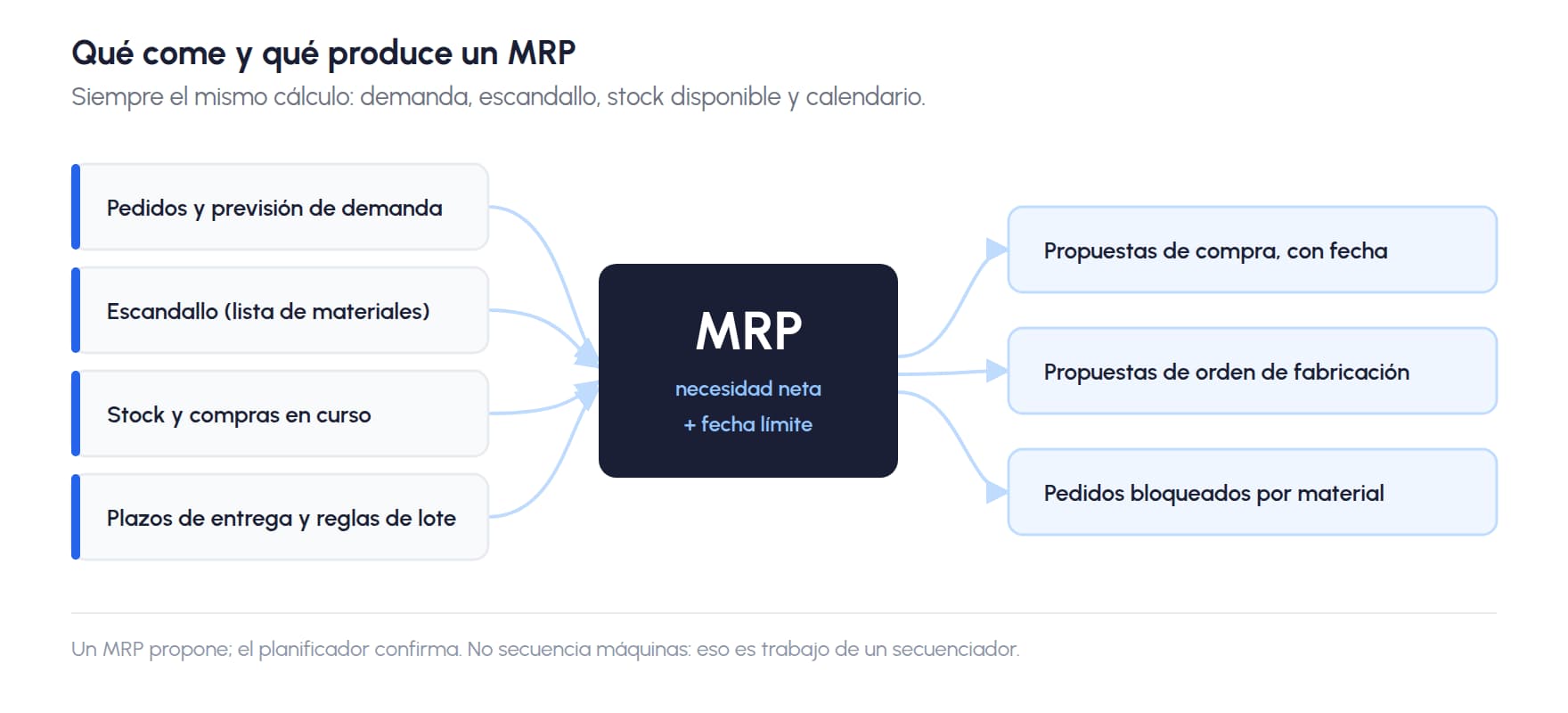
- An MRP answers three questions, and only three: what’s needed, how much, and by when. It doesn’t decide: it makes suggestions.
- The arithmetic of an MRP is trivial. Demand, BOM explosion, subtracting available stock, and scheduling. A spreadsheet can do it.
- What separates a plan that gets signed off on from one that nobody looks at are three pieces of data: actual stock, the bill of materials, and lead time.
- A BOM error multiplies; it doesn’t add. With 98% accuracy per line and 40 lines per product, fewer than half your bills of materials are error-free.
- Your supplier’s lead time isn’t a number, it’s a range. Planning with the average means arriving late half the time, and those are your expedited purchases.
- An MRP is reliable only if it’s fed the data produced by the plant, not a copy synchronized overnight. That’s why planning is an area of a MOM, not a separate program.
What you’ll find here
- What is an MRP
- An MRP calculation fits on a napkin
- Three pieces of data determine whether your MRP gets it right
- The plan will change, and that isn’t a failure
- Where the MRP lives: module, standalone tool, or MOM
- Where to start without changing systems
- Sources
What is an MRP
MRP stands for Material Requirements Planning. It’s the system that answers three questions for every item in your warehouse: what’s needed, how much, and by when.
It needs six things to calculate this, and it needs all of them:
- Demand: confirmed sales orders and forecasts for what hasn’t come in yet.
- The bill of materials: what each product consists of and in what quantities, level by level.
- Available stock: what’s actually there, not what should be there.
- Open purchase orders: what’s already been ordered and when it’s arriving.
- Lead times: how long your supplier takes to deliver and how long it takes you to manufacture.
- Your rules: minimum stock, minimum order quantity or purchasing multiple, desired coverage.
It’s worth establishing two things from the start, because they’re the ones most often confused in a demo.
First: an MRP doesn’t decide; it makes suggestions. It produces a list of dated purchase and manufacturing orders, which a planner reviews and approves. A system that places orders on its own, without anyone looking at them, isn’t a mature MRP: it’s an MRP that nobody trusts enough to have put a brake on it.
Second: an MRP doesn’t sequence. It tells you that you need 500 finished pieces by the 14th. Deciding on which machine, in what order, and with which tooling change is the job of a sequencer. That’s a different, much harder mathematical problem — we break it down in our series on building a modern sequencer.
Finally, the name sounds familiar for a reason: MRP is the grandfather of your ERP. It was born in the factory in the 1960s, grew into MRP II, and from there emerged the software your administration team uses today, now stripped of the factory floor. We tell that story — and explain why the journey back doesn’t work as well — in how ERPs took over the world.
An MRP calculation fits on a napkin
Four steps. Always the same ones.
- Take the demand. What needs to be delivered and by what date.
- Explode the bill of materials. Multiply each product by what it contains, then work down through the levels until you reach what needs to be purchased.
- Subtract what you already have. Available stock plus incoming purchases. What’s left is the net requirement.
- Put it on the calendar. Count backward from the delivery date by the manufacturing time and the supplier’s lead time. That’s the day you need to place the order or release it to production.
With numbers. You need to deliver 100 units of a product that contains 2 components each: a gross requirement of 200. There are 120 in the warehouse and 30 on the way, so you have 150 available and your net requirement is 50. The supplier takes 15 working days, and manufacturing starts on October 6: the order has to go out before September 15.
And that’s it. It’s elementary arithmetic.
What gets complicated isn’t the concept, it’s the volume: 800 active items, three-level bills of materials, half a dozen orders changing every week, and a supplier who delivers in 12 days today and 25 next month. You can do that calculation in Excel once. What you can’t do in Excel is do it every morning, for the entire catalog, without making mistakes.
Three pieces of data determine whether your MRP gets it right
So far, that’s the mechanics, which is the part they’ll show you in any demo. What follows is the only thing that really determines whether the plan that comes out tomorrow morning can be signed off on or has to be corrected by guesswork.
There are three pieces of data. Software won’t fix any of them: the MRP consumes them; it doesn’t produce them.
1. The stock the system thinks you have
Step 3 of the calculation is a subtraction, and a subtraction inherits the errors of its operands. If your stock is overstated by 80 units, the purchase proposal will be short by 80 units. No algorithm, forecast, or artificial intelligence can protect you from that, because the system has no way of knowing the number is false.
What’s interesting is where things go wrong. Almost never during the annual inventory count, which is done properly. It goes wrong in day-to-day consumption: material taken off the shelf midmorning and recorded at the end of the shift, or the next day, or never. It’s the same link that fails in lot traceability, for the same reason: it’s the one record you ask someone to make while their hands are busy.
There’s a very reliable sign that tells you whether you have this data or not. If your buyers add a margin to what the system suggests, the system doesn’t have the data. And that margin isn’t prudence: it’s a loan you make to yourself and pay back every month in tied-up inventory.
2. The bill of materials nobody has looked at again
If stock is the piece of data that breaks most often, the bill of materials is the one that breaks the most things when it does. A stock error affects one item and gets corrected at the next count. A bill of materials error affects every order for that product, every purchase that derives from it, and every cost you calculate with it, indefinitely, until someone notices.
And errors compound. A bill of materials isn’t one piece of data; it’s forty.
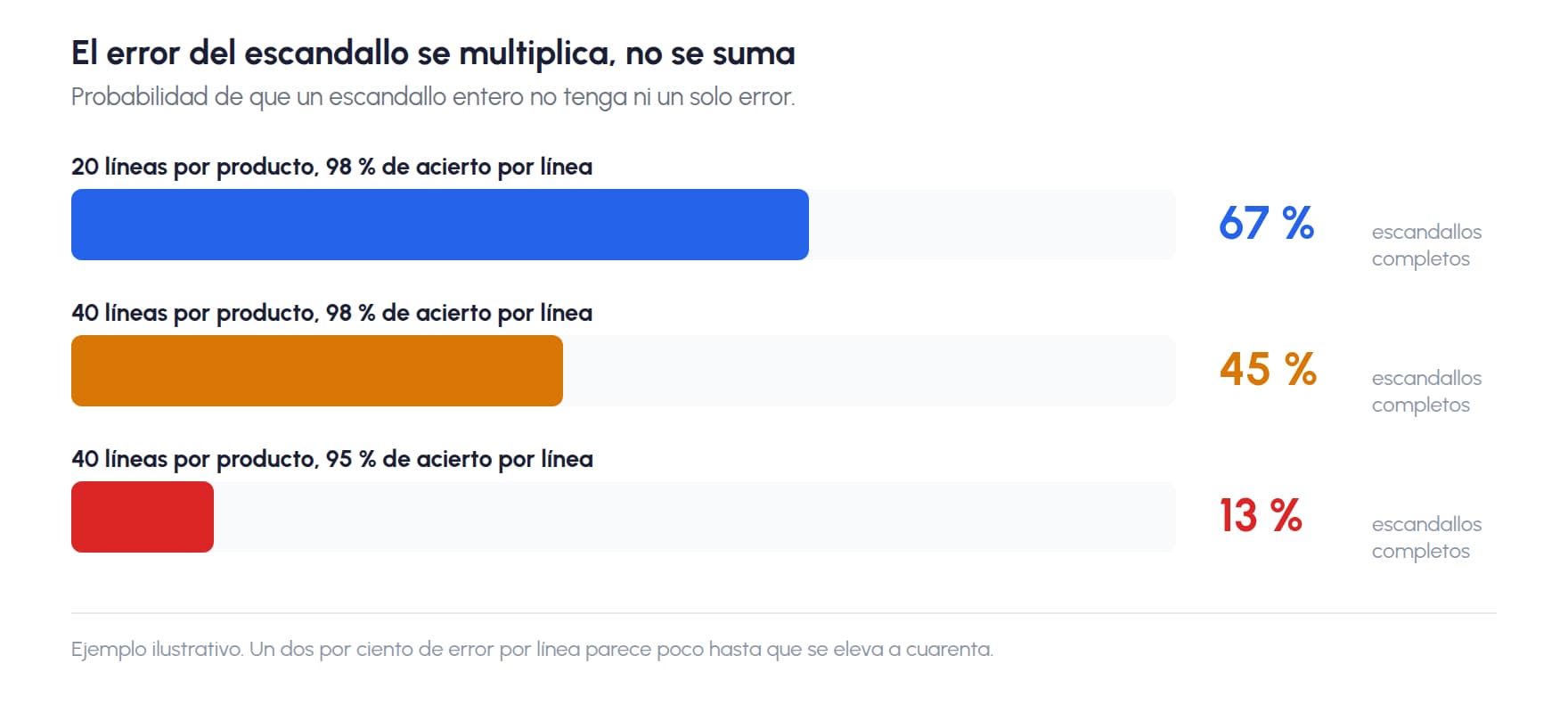
With 98% accuracy on each line — a number that would sound good in any meeting — a product with 40 components has less than a 45% chance of being error-free. Drop accuracy per line to 95% and you’re left with 13%. The arithmetic is relentless: 0.98 to the power of 40 is 0.45.
Where things go wrong: with a change communicated verbally. Engineering replaces one screw with an equivalent one, tells the supervisor, the supervisor tells the operator, and the system keeps ordering the old screw for eight months. In multi-level bills of materials, the error propagates upward and shows up where nobody will look for it.
And no, the solution isn’t to audit all 800. It’s to audit the 20 that account for 80% of your volume and, above all, stop letting bill-of-materials changes travel by word of mouth.
3. The lead time that’s really a range
The fourth step in the calculation counts backward on the calendar using the supplier’s lead time. And there, almost all of us enter the catalog figure: 15 days.
But 15 isn’t the lead time. It’s the average of a range that goes from 12 to 25, depending on the supplier’s workload, the time of year, and how much they like you. Planning with the average means, by definition, arriving late about half the time. And arriving late with the material is exactly what creates expedited purchases, express shipping, and Friday phone calls — in other words, everything you wanted to eliminate when you thought about implementing an MRP.
The fix isn’t to increase safety stock for everything, which is expensive and lazy. It’s to measure. And here’s the good news:
The lead time you need to enter in the system isn’t the one your supplier tells you. It’s the one your own delivery notes tell you.
Order date versus receipt date, for the last twelve months, by supplier and item. You already have that data. Use the 90th percentile for items where a delay stops your production line, and the average where being two days late doesn’t matter.
The plan will change, and that isn’t a failure
Anyone who has rolled out an MRP has had this experience: a customer moves an order by two weeks, the calculation runs again, and suddenly thirty purchase proposals you were about to confirm change. It feels as though the system is unstable. This behavior is so well known in planning literature that it has its own name: nervousness.
The instinctive response is the worst one: run the MRP once a month so it stays put. That doesn’t give you a stable plan; it gives you a plan from a month ago.
What you do is freeze a time horizon. Within the next two weeks — or whatever timeframe your process calls for — orders are firm, and only one person can change them, using their judgment and knowing what the change will disrupt. Beyond that horizon, the MRP can suggest whatever it likes and change its mind every morning. That’s its job.
An MRP that doesn’t change its mind isn’t planning. It’s printing.
Where the MRP lives: module, standalone tool, or MOM
Here’s a figure that changes the conversation: in 2025, 60.4% of Spanish companies with 10 or more employees already had an ERP for sharing information between departments, according to Eurostat. In other words: most factories that plan in Excel have already paid for a planning module. They don’t use it because they don’t trust it.
And they don’t trust it for the reasons we’ve seen above. An MRP inherits the quality of the three pieces of data it consumes, so the relevant question isn’t which MRP has the most features, but where each piece of data comes from.
| ERP module | Standalone MRP | MRP within a MOM | |
|---|---|---|---|
| Where does it get stock from | From administrative transactions (delivery note, invoice) | From periodic synchronization with another system | From physical warehouse movements |
| Where does it get consumption data from | From what someone enters at the end of the shift or day | From what the source system sends it | From the operator’s entry at the workstation, when it happens |
| When does it learn that an order has moved | At the next data transfer | At the next synchronization | Immediately |
| Where is the bill of materials maintained | In administration | In the planning system | In the same place where manufacturing takes place |
None of this is about software quality. The ERP module works perfectly well in companies where warehouse movements are actually recorded in the ERP, and there are plenty of those. And a standalone MRP is a reasonable option if you’ve already figured out who provides it with accurate stock data.
The problem is that in an industrial SME, stock isn’t updated in the ERP. It moves on the shelf, and someone counts it afterward. In that case, an MRP that synchronizes is always planning from a snapshot of yesterday.
That’s why, in the model used by industry, materials planning isn’t a standalone product: it’s an operations-level activity. The IEC 62264 standard — the one that standardizes this — places it at the same Level 3 as production execution, warehousing, quality, and maintenance. In other words, it falls within exactly the same scope as a MOM.
At Bold, planning doesn’t query stock: it lives on top of it. The movement an operator records when consuming material is the same data the calculation subtracts that very morning; the bill of materials it uses is the one engineering maintains on the screen where manufacturing takes place; and allocations are recalculated when an order or purchase order date changes, so the planner can see in a list which orders they can release, which orders they can ship, and which are waiting for material and from whom.
That this is possible isn’t a credit to our MRP. It’s thanks to the MRP sharing a data model with shop-floor execution and the warehouse, instead of communicating with them overnight. Bold is a MOM; planning is one of the areas it covers.
Where to start without changing systems
None of these four steps requires buying anything, and all four can be done this month.
- Audit the bills of materials for the items that account for 80% of your volume. It’s usually twenty. It takes an afternoon of engineering work and, by far, has the greatest impact.
- Get your actual lead times from your delivery notes. Order date versus receipt date, twelve months of data, by supplier. Replace the catalog lead time with your 90th percentile where delays hurt.
- Record consumption at the workstation. It’s the piece of data almost nobody has, and the other two depend on it. You don’t need hardware: it needs to be recorded where the action happens, in two taps. That’s what determines whether shop-floor digitalization ends up producing data or not.
- Freeze a time horizon before automating anything. Decide how many weeks are firm. It takes a meeting, not a project.
Do this, and an MRP will give you a plan you can sign off on. Don’t do it, and it’ll give you the same number as the purchasing manager at the beginning, only faster and with more confidence.
Sources
- IEC 62264-1:2013 — Enterprise-control system integration, Part 1: Models and terminology: defines the domain of manufacturing operations management (Level 3) and its interface with the enterprise level. It’s the framework that places materials planning within operations.
- ISA-95, International Society of Automation — the committee and model behind the previous standard, and the origin of the hierarchy of levels between plant control and enterprise systems.
- Eurostat, isoc_eb_iip — Enterprises who have ERP software package to share information between different functional areas: 60.4% in Spain in 2025, for companies with 10 or more employees.
- INE, Survey on the Use of ICT and E-commerce in Businesses — official data on the digitalization of Spanish businesses, against which to compare the adoption of management software by company size and sector.
Conclusion
An MRP is a very good machine for turning data into purchasing and manufacturing decisions. And precisely because it’s good, it amplifies whatever you give it. With actual stock, a current bill of materials, and measured lead times, it gives you a plan you can sign off on without rereading it. With the data the average factory has, it quickly and confidently gives you the same number someone would have made up by guesswork.
So the useful question isn’t which MRP to buy. It’s where the data it will feed on gets entered.
Discover how Bold plans purchasing and manufacturing based on your plant’s actual movements: request a demo 👇 and check it against your own items.