6 steps for your maintenance calendar in industrial SMEs

2026-06-23

A maintenance calendar is the schedule that assigns specific dates to each preventive and corrective task for every plant asset. It is not the plan itself, but its execution over time: it turns a catalog of activities into something someone actually does at nine o’clock on a Tuesday. When properly developed, it reduces unplanned downtime, organizes preventive and corrective work in the same schedule, and gives production and management greater predictability.
In summary:
Defining the asset inventory and its criticality is essential to building an effective maintenance calendar and avoiding constant rescheduling.
A well-planned calendar significantly reduces unplanned downtime, lowers emergency repair costs, and optimizes spare parts management.
Scheduling should be based on actual frequencies and take operating windows, shifts, and available personnel into account to avoid common mistakes.
Migrating to a CMMS or specialized software is recommended when manual records are no longer reliable because of volume or the need for automation.
Maintaining the discipline to update the calendar spreadsheet weekly is key to the plan’s success during the first year.
Table of contents
-
Operational benefits of maintaining a well-designed calendar
-
Planning vs. scheduling: principles that prevent weekly rescheduling
-
Formats and tools: templates, Gantt charts, and when to move to a CMMS
-
Practical template: how to fill in your own maintenance calendar
-
The straightforward alternative to wrestling with spreadsheets
What a maintenance calendar is and when to use it
The calendar is the final layer of the maintenance plan, not the first step. Before setting a single date, you need an asset inventory, the criticality of each asset, and a catalog of the associated preventive tasks. Without that foundation, the calendar becomes a list of dates with no logic behind them, and the first rescheduling changes can dismantle it within weeks.
The logical sequence is: first define what needs to be maintained and why (the plan), then when each task goes into the actual schedule (scheduling), and finally carry it out using a work order that creates a record.
-
The calendar inherits the asset’s criticality: a compressor that stops the entire line is not scheduled in the same way as a spare fan.
-
Each calendar entry should link to a traceable work order, not be a standalone note.
-
A spreadsheet is sufficient as long as the number of assets and tasks is manageable by hand, usually up to a small number of critical pieces of equipment.
-
When the volume grows or there are multiple shifts and plants, manual tools start to fail when it comes to notifications and traceability.
Operational benefits of maintaining a well-designed calendar
An organized calendar directly tackles maintenance’s most expensive cost: unplanned downtime. Each hour a machine is stopped by a breakdown usually costs more than the equivalent preventive intervention, because it brings production losses, overtime, and sometimes a cascade of damaged parts.
Key fact: Separating preparation, scheduling, and compliance indicators improves the process’s diagnostic capability, because a single aggregated KPI can hide where the system is actually failing.
The benefits most often cited by teams that already work with a stable calendar are:
-
Fewer hours of downtime and lower spending on emergency corrective repairs.
-
Spare parts purchased in advance, instead of emergency orders at emergency prices.
-
Personnel and shift planning aligned with the actual preventive maintenance workload.
-
Reliable reports for management on compliance and asset health.
Practical steps for creating a maintenance schedule
Building a schedule that lasts longer than a quarter requires a specific sequence. Skipping the first step is the mistake that kills more schedules than any other before they reach six months.
-
Step 0, before scheduling anything: confirm that an asset tree and centralized intervention history exist, and that someone is assigned the planner role. Without these, the schedule deteriorates within a few weeks.
-
Inventory and criticality: list each asset and classify it by its impact on production, safety, and cost of failure.
-
Document the tasks: for each asset, define which preventive activities apply and their basic procedures.
-
Set frequencies: operating hours, cycles, fixed calendar intervals, or condition (vibration, temperature). Not all tasks use the same unit.
-
Convert frequencies into actual dates: this is where many schedules fail, because they ignore operating windows, available shifts, and qualified personnel.
-
Review across three time horizons: the full annual cycle, tactical adjustments every quarter, and detailed week-by-week scheduling.
Professional tip: don’t set all the dates for the year at once. Close the annual calendar at the monthly level, but leave the assignment of specific days for the quarterly review, when you already know the actual production workload.
Planning vs. scheduling: principles that prevent weekly rescheduling
Confusing planning and scheduling is the most common cause of calendars that are constantly rewritten. Planning defines how the work should be done: the procedure, spare parts, tools, and skills required. Scheduling decides when that work fits into the available capacity, with a specific date and time window.
A task should only move from “planned” to “ready to schedule” when spare parts are confirmed, the procedure is written, and a technician is available. The principles that reduce friction in weekly scheduling are:
-
Assign each task according to the required skill level, not according to who happens to be free.
-
Schedule based on the team’s actual available hours, not the number of tasks.
-
Respect the priority order between critical preventive work, routine preventive work, and pending corrective work.
-
Record every rescheduling with the original date, new date, reason, and person responsible, following maintenance scheduling principles.
Formats and tools: templates, Gantt charts, and when to move to a CMMS
The right format depends on the volume of assets, not on whatever happens to be trendy. An annual grid in a spreadsheet works well for shops with a few critical pieces of equipment. A Gantt chart helps when tasks overlap and you need to see dependencies. A weekly or daily view is essential on the plant floor, where the operator needs to know what’s due today, not what’s due in March.
The clearest signal that it’s time to migrate to a CMMS or maintenance management system is when the volume of assets makes it impractical to update the spreadsheet by hand without errors, or when you need automatic notifications and a shared history across shifts.
-
A spreadsheet grid is quick to set up but becomes fragile when dealing with dozens of assets.
-
A Gantt chart shows overlaps and is useful for planned shutdowns involving several crews.
-
A CMMS needs to be populated with asset IDs, complete histories, and spare parts availability to deliver real value.
Common mistakes and metrics for monitoring the calendar
The most common mistake is stacking several interventions in the same window, usually for administrative convenience, without checking whether there are enough personnel and spare parts for all of them at once. The second is ignoring actual production operating windows and scheduling preventive work precisely when the line cannot stop. The third is failing to document why something was rescheduled, which makes it impossible to spot patterns.
The indicators that really matter:
-
Schedule compliance: percentage of tasks completed on the scheduled date, without deviation.
-
PM compliance: percentage of preventive tasks completed compared with those planned for the period.
-
Corrective/preventive ratio: how much work is reactive versus planned; a high corrective ratio signals that the calendar isn’t working.
-
Wrench time: proportion of a technician’s time actually spent repairing, compared with time spent traveling and waiting; part of maintenance scheduling principles.
Reviewing these KPIs each month makes it possible to adjust frequencies before an asset starts failing more often than expected.
Practical template: how to fill in your own maintenance calendar
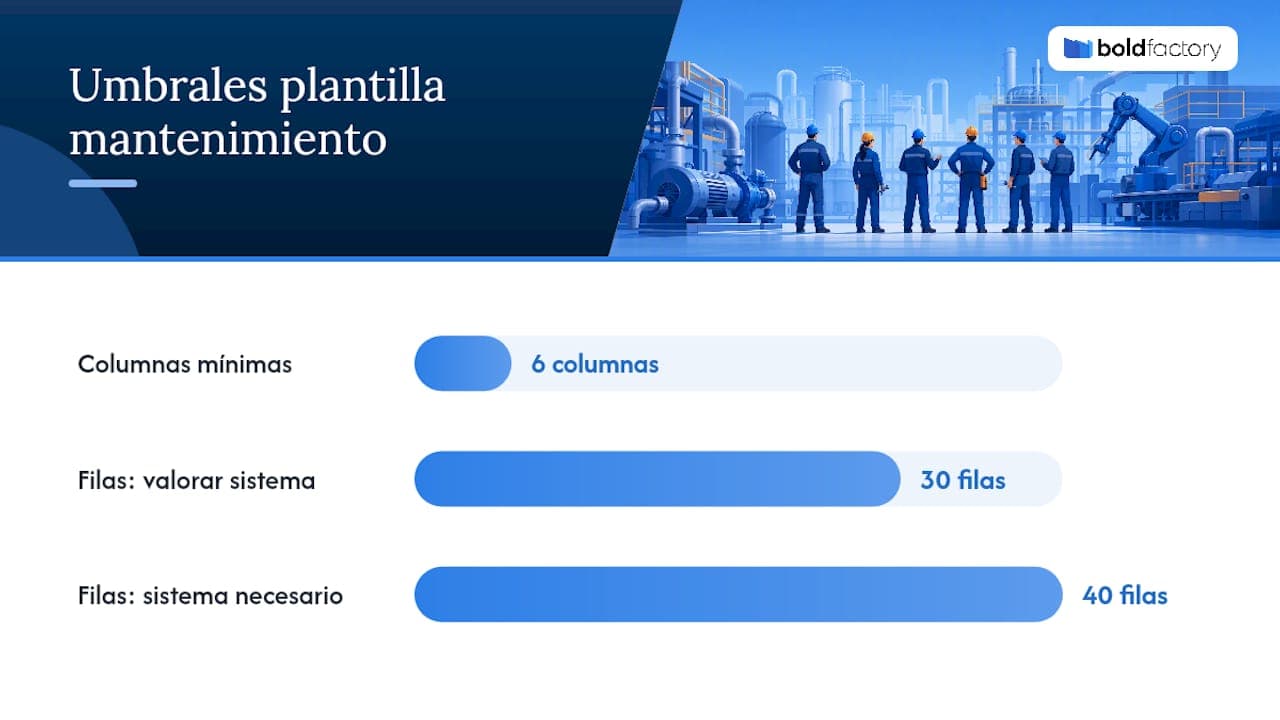
The minimum template needs just six columns to work. The more you add at the beginning, the more likely you are to abandon the spreadsheet by the second month.
Adapt the columns to your industry: in textiles, “affected batch” is often added; in machining, “precision tolerance.” When the spreadsheet starts to have more than thirty or forty active rows with overlapping dates, it’s time to consider a system that generates automatic notifications instead of checking the spreadsheet manually every Monday.
-
Add a “Last intervention” column to calculate the next one without doing the math in your head.
-
Mark critical tasks in a different color so they don’t get lost among routine ones.
How an integrated platform speeds up calendar creation
An assisted maintenance system connects each asset to its history and automatically generates work orders according to the defined frequency, without relying on someone remembering to update a spreadsheet.
-
The calendar syncs with the production module to avoid scheduling a shutdown right during a manufacturing peak.
-
Implementation is usually completed in days, not months of custom development.
-
The operator updates the status of each task from a mobile device, without extensive prior training.
The real limitation is that no software replaces the prior work of defining criticality and frequencies: it automates execution, not the decision.
What “maintenance calendar” means exactly in practice
In industrial maintenance jargon, the more precise technical term is “maintenance scheduling” or “maintenance agenda,” although “maintenance calendar” is the expression plant managers use most in their day-to-day work. All three terms describe the same thing: assigning preventive and corrective tasks to specific dates and shifts, with an assigned person responsible.
It should not be confused with a “preventive maintenance plan,” which is the document that defines what tasks exist and how often they should be repeated, regardless of when they are performed. The plan answers “what needs to be done”; the calendar answers “when it will be done, by whom, and with what resources.”
Nor is it the same as a simple maintenance record, which documents what has already happened. The calendar looks forward; the record looks back, and both feed into the same database if the system is well designed. A mature maintenance planner combines all three elements: the task catalog, the schedule of dates, and the execution history, so that each completed intervention informs the next calculated frequency.
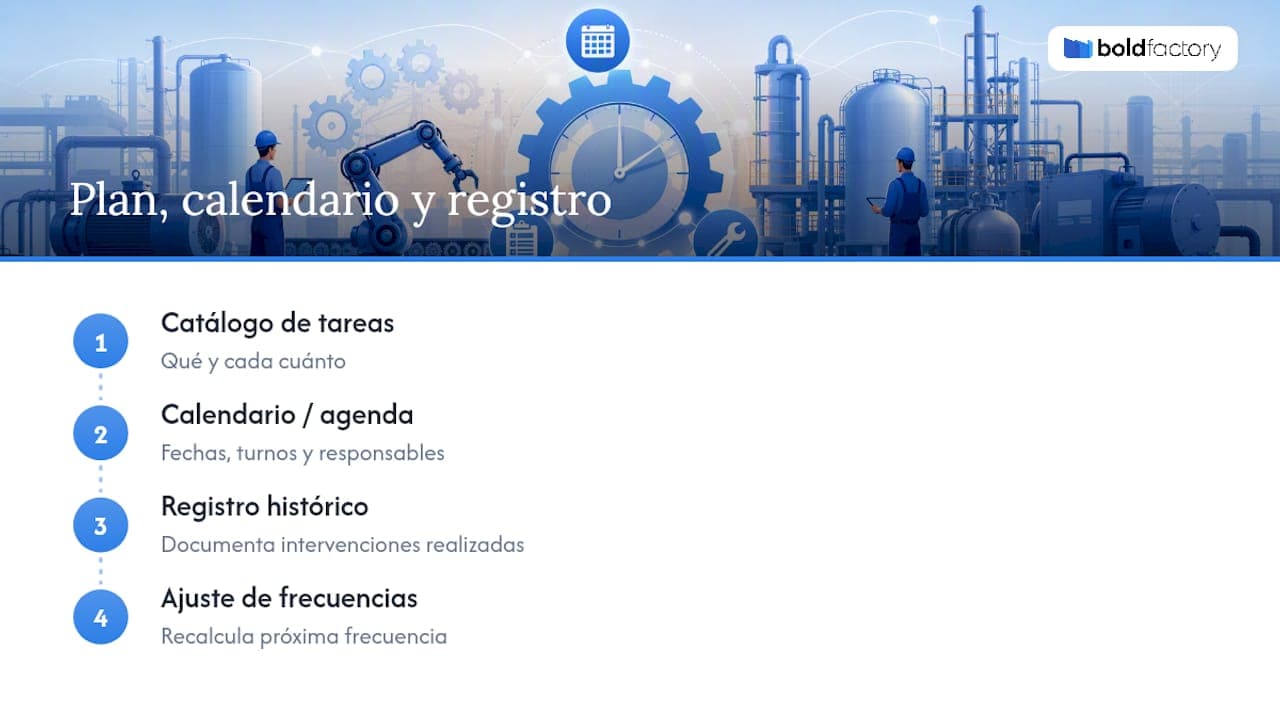
Understanding this distinction prevents the most common mistake among SMEs just starting out: confusing “having a plan” with “having a working calendar.” The first is a document. The second is a live process that is reviewed every week.
What really matters in the first year of a calendar
The first year isn’t won with the prettiest template, but with the discipline to update it every week without exception.
After six or twelve months of real data, it’s worth reviewing frequencies, because there is almost always one task that has been overestimated and another that has been underestimated. Process governance—who approves changes and who records the reasons—matters more than the tool chosen.
The straightforward alternative to wrestling with spreadsheets
There’s an alternative to launching a custom development project when your spreadsheet can no longer handle the volume of assets: with rapid implementation, no required long-term commitment, and a simple interface for operators.
The assisted maintenance module (CMMS) turns your calendar into automatic work orders and connects them with the production module, as well as with planning and purchasing, so a maintenance shutdown never conflicts with an urgent order on the line. Artificial intelligence agents can take care of repetitive tasks, such as generating reminders or updating histories, using simple-language instructions. The operations director can stop chasing outdated spreadsheets and gain visibility into the plant without being physically present. If your current calendar lives in a spreadsheet that no one updates on time anymore, you can request a demo of the complete platform for factories and industrial SMEs and see how it adapts to your asset catalog in a matter of days.