Prevent stockouts: reorder point and MRP/WMS for industrial SMEs

2026-01-20

The reorder point (ROP, for its acronym in English) is the inventory level that triggers a new order before the warehouse runs out of material. It is calculated using the formula ROP = (average demand × lead time) + safety stock. Setting it incorrectly costs money in both directions: too high ties up capital in the warehouse, while too low brings production to a halt when an order arrives late.
In brief:
It is essential to review and update the reorder point regularly to adapt to changes in demand, lead time, or the desired service level.
Variability in demand and delivery times means safety stock must be calculated by considering data dispersion, not just the average.
Integrating MRP and WMS systems automates order triggering, reduces errors, and improves real-time inventory visibility.
The economic order quantity (EOQ) complements the ROP by determining how much to order, preventing excessive or insufficient orders that make management more costly.
The main cause of inventory management errors is the lack of regular ROP reviews, not the complexity of the calculation itself.
Table of contents
-
What exactly is the reorder point, and how is it calculated?
-
Why integrating the reorder point with MRP and WMS reduces errors
-
How the reorder point relates to the economic order quantity
-
Checklist for calculating and reviewing the reorder point by SKU
-
Concrete steps for implementing the reorder point in an industrial SME
-
What most factories overlook when setting their reorder point
-
How Bold Factory automates reorder point calculation and order triggering
What exactly is the reorder point, and how is it calculated?
The reorder point combines three pieces of data that almost no industrial SME has all in one place: how much of a material is consumed, how long the next order takes to arrive, and what safety margin you need to cover unexpected events. The standard formula looks simple, but each term requires careful measurement.
Average demand is calculated over a representative period, usually between 30 and 90 days, and always using the same time unit as the lead time. If you sell 450 units per month, average daily demand is 15 units, assuming 30 calendar days. This step may seem trivial, but it is where the most calculation errors occur: mixing monthly demand with a lead time expressed in weeks produces an incorrect ROP, and no one notices until material runs out on the shop floor.
Lead time is the time between placing the order (with a supplier or with your own production line) and the moment the material is available for consumption. For purchasing, it includes the time from sending the order until the material passes incoming quality inspection. For in-house manufacturing, it is the actual duration of the production order, not the theoretical time shown on the routing sheet.
Common errors when putting this calculation together:
-
Using annual demand and a lead time in days without converting both to the same unit.
-
Measuring lead time from when goods arrive at the loading dock, ignoring the time needed for inspection and put-away in the warehouse.
-
Ignoring non-working days when converting weeks into actual production calendar days.
-
Calculating demand using data from a single atypical month (campaign, promotion, shutdown) instead of a representative period.
How variability affects the safety stock calculation
An ROP calculated using averages alone works as long as nothing deviates from the plan. As soon as a supplier is delayed by a week or a customer places an out-of-season order, that calculation falls short. That is why safety stock is not an accounting whim: it is the variable that absorbs the real uncertainty in demand and lead time.
Variability is measured using the standard deviation of your historical data, both for daily demand and for the lead time of each supplier or production line. The greater the dispersion of that data around its average, the larger the buffer you need.
-
90% service level: moderate buffer, acceptable for low-cost or easily replaceable materials.
-
95% service level: the most common choice for critical production components.
-
99% service level: reserved for parts whose absence brings the entire line to a halt.
Relying only on the historical average without looking at dispersion is the most common mistake in plants beginning to formalize their inventory management. Two items can have the same average demand and need very different safety stocks if one has stable consumption and the other has irregular spikes.
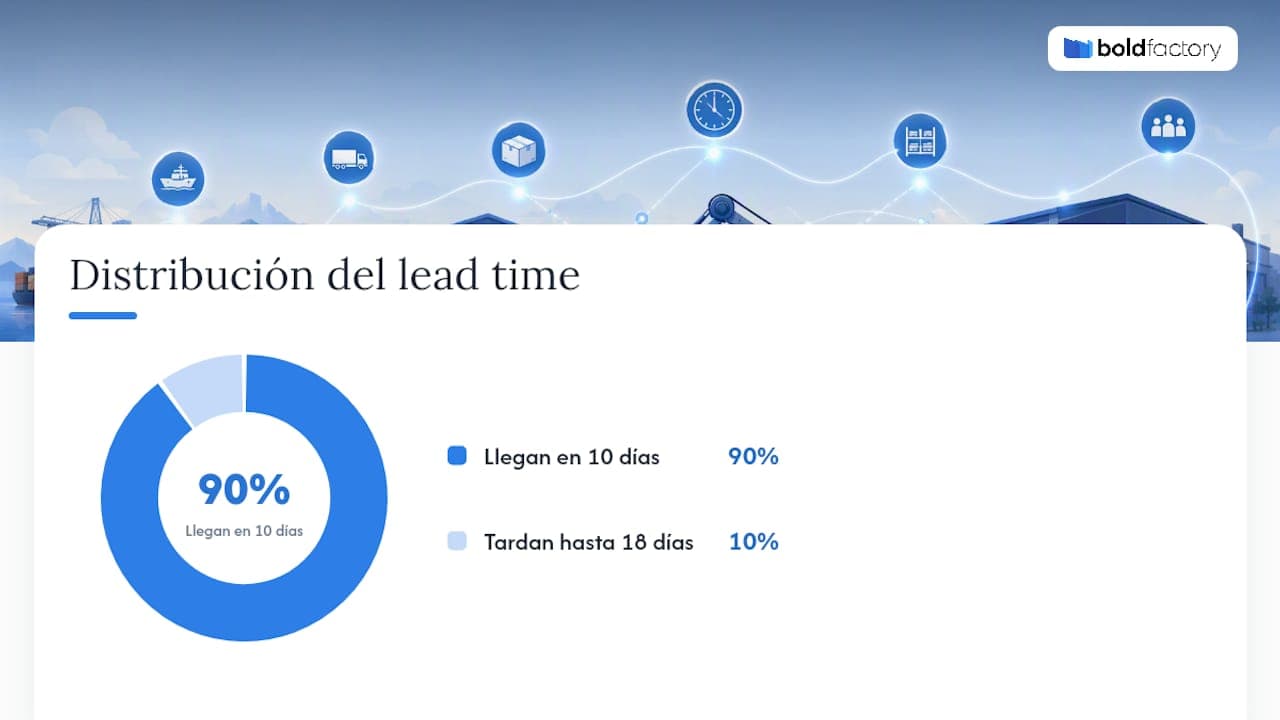
Professional tip: review lead time as a distribution of data, not as a single number. If [object Object] of your orders arrive in 10 days but some take 18, your safety stock needs to protect you against that extreme scenario, not the average.
Practical example of calculating the reorder point
To replicate the calculation with your own data, you need to gather four figures and follow the same order for each SKU.
-
Gather the input data: average daily demand, average lead time in days, standard deviation of demand, and target service level. Suppose we have a metal component with average demand of a few dozen units per day, a lead time of several days, and a moderate standard deviation in daily demand.
-
Calculate demand during lead time: 20 units/day × 8 days = 160 units. That is the amount you need to consume while waiting for the next order.
-
Calculate safety stock: at a 95% service level (an approximate factor of 1.65 applied to the standard deviation adjusted for lead time), and with a combined deviation of about 11.3 units, the resulting safety stock is approximately 19 units.
-
Add both components to get the ROP: 160 + 19 = 179 units. As soon as available inventory reaches that level, the order is placed.
-
Validate the result against historical data: review the last six months and check how often you would have run out of stock with that ROP. If hypothetical stockouts exceed 5% of the periods analyzed, the calculation needs adjustment.
Applying this same procedure by product family, rather than to the entire factory all at once, makes it possible to validate the calculation without complex tools.
What happens when the reorder point is miscalculated
An ROP that is too high and one that is too low create different problems, but both are costly. Excess stock ties up capital that could be put to other uses, takes up warehouse space, and increases the risk of obsolescence for materials with a limited useful life or frequent engineering changes.
A stockout, at the other extreme, halts production lines, forces urgent purchases at a premium, and, if the material affects a customer order, damages the company's delivery reputation. A poorly defined reorder point causes avoidable losses in both cases, whether through tied-up capital or lost sales.
-
Cost of holding excess stock: tied-up capital, warehouse space, insurance, and risk of obsolescence.
-
Cost of a stockout: line stoppages, urgent purchases at higher prices, and contractual penalties for delays.
-
Hidden cost of indecision: continuing to adjust the ROP “by eye” without a metric to confirm whether the actual service level is improving or getting worse.
Estimating these costs, even approximately, helps you decide how much to invest in safety stock versus the actual stockout risk for each item.
How to keep the reorder point up to date over time
An ROP calculated once and then forgotten does not age well. Lead time and demand fluctuate with seasonality, supplier changes, or market variations, and a static ROP can be just as risky as having none at all.
There are two review approaches. Periodic review (monthly or quarterly) is enough for materials with stable consumption and low risk. Continuous review, supported by a system that recalculates the ROP with each stock movement, is necessary for critical items or those with highly variable demand.
Three signs indicate that it is time to recalculate before the scheduled review:
-
A supplier's actual lead time has consistently deviated from the historical data used in the calculation.
-
The standard deviation of monthly demand has grown significantly compared with the period used to set safety stock.
-
The actual service level (measured by actual stockouts) is moving away from the target set when calculating the ROP.
Professional tip: use rolling 30- to 90-day windows to recalculate safety stock for your most variable items instead of setting it once a year. A dynamic ROP adjusts before the problem reaches the shop floor.
Why integrating the reorder point with MRP and WMS reduces errors
Calculating the reorder point in a spreadsheet works for a while, until the number of items grows or several people edit the same file. Digitalization and integration with MRP and WMS systems provide real-time visibility and automate order triggering, directly reducing manual errors.
-
Automatic alerts when available stock reaches the ROP, without relying on someone to check Excel in time.
-
Purchase or production orders generated by an event, with no intermediate manual steps.
-
Mobile visibility for the plant manager, without needing to be at a computer.
The typical automation workflow is simple: the system records each material consumption, compares available stock with the current ROP for each SKU, and, when the threshold is crossed, automatically issues the corresponding order to the planning and purchasing module. A platform that brings production control and the warehouse together in the same system avoids the discrepancy that occurs when stock data lives in an Excel file and the purchase order is somewhere else.
How the reorder point relates to the economic order quantity
The reorder point answers when to order. The economic order quantity (EOQ) answers how much to order. These are two separate decisions that need to work together: calculating the ROP correctly and then ordering an arbitrary quantity (too small or too large) negates some of the benefit of the calculation.
The basic EOQ formula is √(2 × annual demand × cost per order / holding cost per unit), and it aims to minimize the total cost of managing inventory. In practice, coordinating the ROP with the EOQ prevents two common mistakes: ordering small quantities too frequently, which drives up administrative and transportation costs, or ordering large batches, which drives up storage costs.
-
For items with highly fluctuating demand, review the EOQ as often as the ROP, rather than independently.
-
If the supplier requires minimum order quantities, the ROP must be calculated with that constraint in mind, not the other way around.
Checklist for calculating and reviewing the reorder point by SKU
Before applying the calculation across the entire factory, it is a good idea to organize the process into verifiable steps.
-
Collect and validate the data: historical demand (at least three months), actual lead time by supplier or production order, and target service level by product family.
-
Calculate the ROP and run a backtest: apply the result to the last six months and check how many hypothetical stockouts it would have caused.
-
Set up alerts and review frequency: decide which items need continuous review and which can be reviewed quarterly.
-
Document and assign responsibilities: record who updates the ROP, how often, and which source data they use.
Professional tip: start the rollout with just one product family, not the entire catalog at once. Validating the method on 20 or 30 items before scaling it up prevents a calculation error from being carried over to hundreds of SKUs.
Concrete steps for implementing the reorder point in an industrial SME
Taking the reorder point from theory into a factory's daily operations requires a specific sequence, not just a formula. The first step is to classify the items: not all materials need the same level of calculation rigor. Critical components with long lead times or a single supplier deserve an ROP calculated using detailed variability data. Low-cost consumables can be managed with simpler rules.
The second step is to decide who makes the decisions and who carries them out. In many SMEs, the plant manager notices that material is running low and calls the person in charge of purchasing; this informal process works until the key person goes on vacation. Formalizing the ROP means that any operator, not just an expert, understands when an order needs to be placed.
The third step is to test before rolling it out broadly. Apply the calculation to a product family for one or two months, compare actual stockouts with predicted ones, and adjust the service level if the result deviates from the target. Only after this validation should you extend the method to more items or move toward a system that automates order triggering.
The fourth step, almost always overlooked, is to explicitly review lead time with the supplier. Many SMEs calculate the ROP using a theoretical lead time that the supplier never actually meets, and discover the mismatch only after it has already caused a stockout.

What most factories overlook when setting their reorder point
Most of the factories I know do not fail at the formula; they fail at the discipline of updating it. They calculate the ROP once, using data from a good month, and leave it unchanged for years while the business changes around it. The problem is not mathematical; it is organizational: no one is assigned the task of reviewing it.
What really separates an SME that controls its stock from one that spends its time putting out fires is not the sophistication of the calculation, but how often it is checked against reality. Measure how many stockouts and how much excess stock a new ROP generated compared with what was expected, both 30 and 90 days after implementation. That comparison, more than the formula itself, tells you whether the method works in your particular factory.
There are systems that replace the Excel spreadsheets many SMEs use to calculate and monitor their ROP with solutions that compare available stock against the reorder point for each item in real time, without anyone having to check it manually every morning.
Platforms such as Bold Factory bring planning and purchasing (MRP), warehousing (WMS/SGA), and production (MES) together in a single system, with AI agents that can handle repetitive tasks such as generating a purchase order as soon as stock reaches the set threshold or even updating the ROP. Some of these systems can be implemented in a few days and have no long-term commitment, which may be relevant for operations directors who need quick results. The plant manager can also check the status of each SKU from a mobile phone, without having to be at a computer in the office.
If you manage dozens or hundreds of items and Excel is no longer enough, you can review Bold Factory's MRP planning module or request a demo to see how the reorder point is calculated and automated using your own data.
Sources
To learn more about calculating and digitizing the reorder point, it is worth reviewing the inventory levels guide on EOQ and ROP, the Wolters Kluwer inventory control analysis, and, to understand lead time variability in industrial supply, the technical article from ASTRA CHEMICAL on delivery times.
-
What the reorder point is and how it is calculated | EAE